
The Department of Education has issued DepEd Order No. 015, s. 2026, titled Revised Guidelines on Classroom Assessment, Grading System, and Awards and Recognition for the K to 12 Basic Education Program.
The revised guidelines provide the official classroom assessment and grading provisions for the three-term school calendar. For Grades 4–10, these include updated assessment component names, recommended numbers of summative assessments, subject-specific component weights, an adjusted transmutation table for SY 2026–2027, and new qualitative grade descriptors.
To support teachers in implementing these changes, EduFilesPH is sharing a Free Three-Term E-Class Record for Grades 4–10. The Excel workbooks are organized by learning area and are designed to help teachers record learner scores, compute grades, review learner performance, and maintain organized class records.
This page also explains the major grading provisions behind the ECR so teachers can understand how the automated computations work and verify the results generated by the workbook.
Updated Policy Basis
This resource has been revised using the official provisions of DepEd Order No. 015, s. 2026. It replaces the preliminary grading information previously presented on this page.
The official order was published by the Department of Education on June 4, 2026.
Resource Information
| Resource Detail | Description |
|---|---|
| Resource Title | Three-Term Electronic Class Record |
| Grade Levels | Grades 4–10 |
| Key Stages | Key Stage 2 and Key Stage 3 |
| School Year | SY 2026–2027 |
| File Format | Microsoft Excel Workbook |
| Calendar Structure | Three Terms |
| Policy Basis | DepEd Order No. 015, s. 2026 |
| Main Use | Recording scores and computing learner grades |
| Automation | Formula-based grade computation |
| File Protection | Important formulas and computation areas are protected |
| Availability | Free EduFilesPH resource |
| Developed by | EduFilesPH |
Who Can Use This ECR?
This free Electronic Class Record is intended for teachers handling:
Key Stage 2
- Grade 4
- Grade 5
- Grade 6
Key Stage 3
- Grade 7
- Grade 8
- Grade 9
- Grade 10
Available learning-area versions include:
- Filipino
- English
- Mathematics
- Science
- Araling Panlipunan
- GMRC for Grades 4–6
- Values Education for Grades 7–10
- MAPEH
- EPP and TLE
Grades 1–3 are not included in this download set because Key Stage 1 follows separate transitional provisions under DepEd Order No. 015, s. 2026.
What Is an Electronic Class Record?
An Electronic Class Record, commonly called an ECR, is an Excel-based tool used by teachers to record assessment scores and compute learner grades.
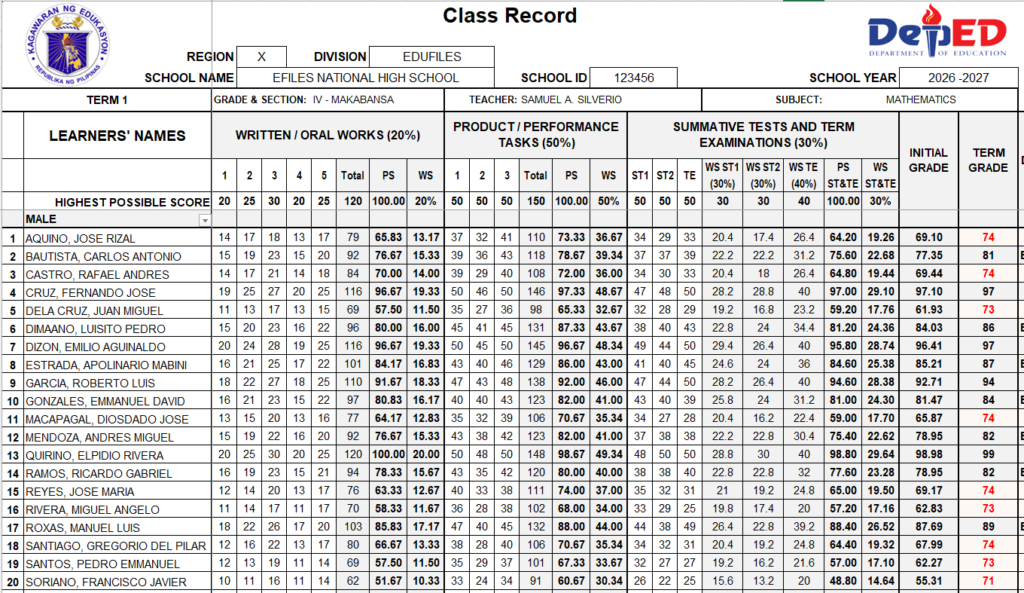
Instead of manually calculating Percentage Scores, Weighted Scores, Initial Grades, and Term Grades, teachers can enter learner scores in the designated cells and allow the workbook formulas to perform the required computations.
A properly prepared ECR may help teachers:
- organize learner information;
- record scores by assessment component;
- reduce repetitive manual computation;
- identify missing or incorrect entries;
- compare learner performance across terms;
- review grades before submission;
- prepare cleaner class records; and
- maintain one structured record for the entire school year.
The ECR remains a support tool. Teachers are still responsible for checking the accuracy of encoded information and validating all generated results.
Major Changes Under DepEd Order No. 015, s. 2026
For Grades 4–10, the revised grading system includes the following provisions:
- three academic terms in one school year;
- Written/Oral Works or WWs;
- Product/Performance Tasks or PTs;
- Examinations or EXs;
- two Summative Tests and one Term Examination per term;
- subject-specific component weights;
- a 30%-30%-40% internal distribution within the Examinations component;
- an adjusted transmutation table for SY 2026–2027;
- qualitative proficiency descriptors;
- Final Grades based on the average of the three Term Grades; and
- transition to zero-based grading beginning SY 2027–2028.
The order retains numerical grading for Key Stages 2 and 3 while introducing these revised assessment and reporting arrangements.
Formative Assessment and Grade Computation
Formative assessment remains an important part of daily instruction. Teachers use it to:
- identify learning gaps;
- monitor learner progress;
- provide timely feedback;
- adjust teaching strategies;
- plan remediation or enrichment; and
- help learners reflect on their own learning.
However, formative assessment results are not included in the computation of numerical grades.
The official order states that formative assessment is primarily intended to improve learning. Only the prescribed summative assessment components are included in the computation of the Term Grade.
Summative Assessment Components
The revised grading system uses three main summative assessment components.
| Component | Description |
|---|---|
| Written/Oral Works or WWs | Written or spoken responses such as essays, reports, problem-solving activities, oral responses, journals, and structured presentations |
| Product/Performance Tasks or PTs | Authentic tasks that allow learners to apply knowledge and skills through projects, investigations, demonstrations, performances, portfolios, and other outputs |
| Examinations or EXs | Assessments administered at key points during the term, consisting primarily of Summative Test 1, Summative Test 2, and the Term Examination |
Teachers should select assessment tasks that provide valid evidence of the intended learning competencies. A smaller number of meaningful assessments may provide better evidence than numerous repetitive activities.
Recommended Number of Assessments Per Term
For Grades 4–12, DepEd Order No. 015, s. 2026 provides the following recommended ranges:
| Assessment Component | Recommended Number Per Learning Area, Per Term |
|---|---|
| Written/Oral Works | 3–5 |
| Product/Performance Tasks | 2–3 |
| Summative Tests | 2 |
| Term Examination | 1 |
These numbers are presented as flexible guidance. Teachers should still consider:
- the competencies covered;
- available instructional time;
- learner needs;
- the purpose of the assessment;
- the quality of evidence collected; and
- applicable school or division instructions.
The order discourages unnecessary assessment overload and emphasizes the use of reasonable and purposeful summative assessments.
Suggested Assessment Schedule
The official guidelines provide general timing for the major examinations within a term.
Summative Test 1
Summative Test 1 may cover lessons taught during approximately the first 15 instructional days and may be administered around the 16th instructional day.
Summative Test 2
Summative Test 2 may cover lessons taught during the next 15 instructional days and may be administered around the 32nd instructional day.
Term Examination
The Term Examination is administered during the final instructional days of the term. It primarily covers the competencies taught after Summative Test 2 while also including selected critical or least-mastered competencies from earlier parts of the term.
The tests should be:
- teacher-made;
- aligned with the competencies taught;
- based on actual classroom instruction;
- guided by a Table of Specifications; and
- appropriate to the learners’ grade level.
Number of Term Examination Items
| Key Stage | Grade Levels | Required Number of Items |
|---|---|---|
| Key Stage 2 | Grades 4–6 | 40 items |
| Key Stage 3 | Grades 7–10 | 50 items |
The prescribed numbers refer to test items. The total number of points may vary depending on the type of test questions and the approved Table of Specifications.
The number of items in each Summative Test should not exceed half of the prescribed number of Term Examination items. Therefore:
- a Summative Test for Grades 4–6 should not exceed 20 items; and
- a Summative Test for Grades 7–10 should not exceed 25 items.
These provisions are reflected in the official Term Examination table of DepEd Order No. 015, s. 2026.
Assessment Weight Distribution for Grades 4–10
Teachers must download and use the correct subject file because the assessment component weights are not the same for all learning areas.
| Learning Area or Subject Group | WWs | PTs | EXs |
|---|---|---|---|
| English | 20% | 50% | 30% |
| Filipino | 20% | 50% | 30% |
| Mathematics | 20% | 50% | 30% |
| Science | 20% | 50% | 30% |
| Araling Panlipunan | 20% | 50% | 30% |
| GMRC | 20% | 50% | 30% |
| Values Education | 20% | 50% | 30% |
| EPP | 20% | 60% | 20% |
| TLE | 20% | 60% | 20% |
| MAPEH | 20% | 60% | 20% |
The subject-specific weight distribution is one reason teachers should not use one ECR file for every learning area without checking its formulas and setup.
Weighting Within the Examinations Component
The Examinations component is composed of three assessments.
| Examination | Weight Within the EXs Component |
|---|---|
| Summative Test 1 | 30% |
| Summative Test 2 | 30% |
| Term Examination | 40% |
| Total | 100% |
The scores for ST1, ST2, and the Term Examination are first combined using the 30%-30%-40% distribution.
The resulting examination Percentage Score is then multiplied by the overall EXs weight assigned to the learning area.
For example:
- Mathematics uses a 30% overall EXs weight.
- MAPEH uses a 20% overall EXs weight.
The 30%-30%-40% calculation is performed inside the Examinations component before its overall subject weight is applied.
How the Term Grade Is Computed
The ECR follows the main grade-computation process prescribed in the official order.
Step 1: Compute the Percentage Score
For each assessment component:
Percentage Score = Total Learner Score ÷ Highest Possible Score × 100
Step 2: Compute the Weighted Score for WWs
Multiply the Written/Oral Works Percentage Score by the prescribed WW weight.
Step 3: Compute the Weighted Score for PTs
Multiply the Product/Performance Tasks Percentage Score by the prescribed PT weight.
Step 4: Compute the Examinations Score
Combine:
- Summative Test 1 at 30%;
- Summative Test 2 at 30%; and
- Term Examination at 40%.
The combined result is then multiplied by the prescribed overall EXs weight for the learning area.
Step 5: Compute the Initial Grade
Add the Weighted Scores from:
- Written/Oral Works;
- Product/Performance Tasks; and
- Examinations.
The total is the learner’s Initial Grade for the term.
Step 6: Apply the Adjusted Transmutation Table
For SY 2026–2027, the Initial Grade is converted into a whole-number Term Grade using the official adjusted transmutation table.
An Initial Grade of 70.00 corresponds to the minimum passing Term Grade of 75.
Official Adjusted Transmutation Table for SY 2026–2027
The following is the adjusted transmutation table prescribed in DepEd Order No. 015, s. 2026.
| Initial Grade | Term Grade | Initial Grade | Term Grade |
|---|---|---|---|
| 99.50–100.00 | 100 | 74.72–75.89 | 79 |
| 98.32–99.49 | 99 | 73.54–74.71 | 78 |
| 97.14–98.31 | 98 | 72.36–73.53 | 77 |
| 95.96–97.13 | 97 | 71.18–72.35 | 76 |
| 94.78–95.95 | 96 | 70.00–71.17 | 75 |
| 93.60–94.77 | 95 | 65.34–69.99 | 74 |
| 92.42–93.59 | 94 | 60.67–65.33 | 73 |
| 91.24–92.41 | 93 | 56.01–60.66 | 72 |
| 90.06–91.23 | 92 | 51.34–56.00 | 71 |
| 88.88–90.05 | 91 | 46.67–51.33 | 70 |
| 87.70–88.87 | 90 | 42.01–46.66 | 69 |
| 86.52–87.69 | 89 | 37.34–42.00 | 68 |
| 85.34–86.51 | 88 | 32.68–37.33 | 67 |
| 84.16–85.33 | 87 | 28.01–32.67 | 66 |
| 82.98–84.15 | 86 | 23.35–28.00 | 65 |
| 81.80–82.97 | 85 | 18.68–23.34 | 64 |
| 80.62–81.79 | 84 | 14.01–18.67 | 63 |
| 79.44–80.61 | 83 | 9.35–14.00 | 62 |
| 78.26–79.43 | 82 | 4.68–9.34 | 61 |
| 77.08–78.25 | 81 | 0.00–4.67 | 60 |
| 75.90–77.07 | 80 |
Under the adjusted table:
- an Initial Grade of 70.00 is the minimum needed to obtain a passing Term Grade of 75;
- Initial Grades below 70.00 are mapped to Term Grades from 60 to 74; and
- 60 is the minimum reportable grade.
The order describes this table as a transitional mechanism toward zero-based grading.
Important Change Beginning SY 2027–2028
Beginning SY 2027–2028, a zero-based grading system will be implemented for Key Stages 2 to 4.
Under zero-based grading:
- the computed grade will directly become the Term Grade;
- no transmutation table or conversion will be applied; and
- 75 will remain the minimum passing grade.
Because of this policy change, ECR files created specifically for SY 2026–2027 should not automatically be reused for SY 2027–2028 unless their formulas and grading setup have been updated.
Grade Descriptors and Instructional Response
Numerical grades are accompanied by qualitative descriptors that help teachers interpret learner performance and determine the support that may be needed.
| Numerical Grade | Descriptor | Filipino Descriptor | General Interpretation |
|---|---|---|---|
| 90–100 | Advancing | Namumukod-tangi | Consistently demonstrates skills and understanding that meet or exceed standards with independence and depth |
| 80–89 | Benchmarking | Napamamalas | Demonstrates the expected grade-level competencies independently and consistently |
| 75–79 | Connecting | Natutungo | Demonstrates sufficient understanding but may still require occasional guidance |
| 65–74 | Developing | Napauunlad | Demonstrates partial understanding and requires targeted remediation and support |
| 0–64 | Emerging | Nagsisimula | Requires intensive, structured, and sustained intervention |
These descriptors should be used to guide:
- enrichment;
- deeper application of learning;
- guided practice;
- remediation;
- intervention;
- learner feedback; and
- instructional planning.
They are not intended merely as labels for learners.
Final Grade and General Average
The Final Grade in each learning area is computed by averaging the three Term Grades:
Final Grade = (Term 1 Grade + Term 2 Grade + Term 3 Grade) ÷ 3
The result is rounded to the nearest whole number.
A Final Grade of 75 or higher indicates that the learner has met the minimum standard in the learning area.
A Final Grade below 75 requires appropriate remediation, intervention, or academic support.
For Grades 4–10, the General Average is computed by averaging the Final Grades in all learning areas taken during the school year. It is also reported as a whole number.
Features of the Three-Term ECR
Depending on the subject version, the workbook may include:
- separate sections for Term 1, Term 2, and Term 3;
- editable school and class information;
- editable learner lists;
- subject-specific assessment weights;
- score-entry areas for WWs and PTs;
- separate entries for ST1, ST2, and the Term Examination;
- automatic Percentage Score computation;
- automatic Weighted Score computation;
- automatic Initial Grade computation;
- official adjusted transmutation for SY 2026–2027;
- automatic Term Grade computation;
- proficiency descriptors;
- Final Grade computation;
- learner summaries;
- printable class-record sections; and
- protected formula and computation cells.
Features may differ slightly according to the grade level and learning-area version.
How to Use the Electronic Class Record
1. Download the Correct Subject Version
Select the workbook that matches your grade level and learning area.
This is especially important because EPP, TLE, and MAPEH use different component weights from English, Filipino, Mathematics, Science, Araling Panlipunan, GMRC, and Values Education.
2. Save an Original Backup
Keep one untouched copy of the downloaded workbook.
Create a separate working copy for every class or section before entering learner information.
3. Read the Workbook Guide
Review the instructions, color coding, editable areas, and reminders provided inside the file.
Do not begin encoding until you understand which cells are intended for user input.
4. Enter the School and Class Information
Complete the designated fields for:
- school name;
- school ID, where applicable;
- grade level;
- section;
- learning area;
- teacher’s name; and
- school year.
5. Encode the Learner List
Enter learner names carefully in the designated input area.
Check the spelling and order of names before entering assessment results.
6. Enter the Highest Possible Scores
Verify the Highest Possible Score for every activity, task, test, and examination.
An incorrect Highest Possible Score will affect:
- the Percentage Score;
- the Weighted Score;
- the Initial Grade; and
- the Term Grade.
7. Enter Learner Scores
Encode scores only in the editable areas provided for:
- Written/Oral Works;
- Product/Performance Tasks;
- Summative Test 1;
- Summative Test 2; and
- Term Examination.
Do not enter values greater than the corresponding Highest Possible Score.
8. Review the Generated Results
Check the:
- component totals;
- Percentage Scores;
- Weighted Scores;
- Initial Grades;
- Term Grades;
- descriptors; and
- Final Grades.
9. Validate Before Submission
Compare selected learner computations with a manual calculation before using the workbook for official reporting.
Follow your school’s checking, validation, submission, and approval procedures.
Teacher Validation Checklist
Before submitting grades, check the following:
- The correct subject ECR was used.
- All learner names are complete and correctly spelled.
- Highest Possible Scores are correct.
- No score exceeds the Highest Possible Score.
- Blank cells represent actual missing entries and not overlooked scores.
- ST1, ST2, and the Term Examination are entered in the correct columns.
- Assessment component weights match the learning area.
- Generated grades are within the expected range.
- Sample computations match a manual check.
- Final Grades are based on the three Term Grades.
- Confidential learner information is properly protected.
- The latest corrected version of the workbook is being used.
Protected Workbook Notice
Important formulas, linked cells, hidden computation areas, and workbook structures are protected to reduce accidental changes.
Teachers should encode only in the designated input cells.
Please do not:
- delete hidden rows or columns;
- rename worksheets without instructions;
- overwrite formula cells;
- change the transmutation lookup table;
- remove workbook links;
- alter print areas without checking the output; or
- attempt to bypass workbook protection.
Protection is intended to preserve the functionality of the workbook. It is not a guarantee that every possible data-entry error will be prevented.
If you find an error or unexpected result, contact EduFilesPH instead of editing the protected computation areas.
Learner Data and Privacy Reminder
Electronic Class Records contain confidential learner information.
Teachers should:
- save the workbook on a secure device;
- use authorized school storage when available;
- protect files with appropriate access controls;
- avoid sharing unprotected ECRs in public group chats;
- conceal names and LRNs in screenshots;
- maintain regular backup copies; and
- remove personally identifiable information before using online troubleshooting tools.
DepEd Order No. 015, s. 2026 states that personally identifiable learner data must not be uploaded to artificial intelligence platforms. Names, LRNs, photographs, and other identifying information should be removed before a file or screenshot is submitted for AI-assisted analysis.
Preview of the Three-Term ECR
Official DepEd Reference
Teachers are encouraged to read the complete official order and its annexes before implementing the revised grading system.
Read DepEd Order No. 015, s. 2026
Optional Advanced ECR Version
👉 Want a more advanced and fully automated version of this E-Class Record?
🚀 We also offer an Advanced Electronic Class Record (ECR) with additional features designed to make grading faster, more accurate, and more insightful:
📌 Learner’s Individual Record (LIR) – for student/parent viewing
📊 Test Result Analysis (TRA) – MPS, Mean, Median, and SD
📈 Grade Classification – Level of Progress and Achievement
📅 Mini-SF2 – Student’s Attendance Monitoring
Kindly message us and let us know the subject you want so we can provide the details.
Available for:
✔ Key Stage 1: Grade 2 and Grade 3
✔ Key Stage 2: Grades 4–6 (All subjects)
✔ Key Stage 3: Grades 7–10 (All subjects)
✔ Key Stage 4: Core, Other Acad Electives, TechPro, Etc.
📢 Note: Kinder and Grade 1 will now used the PACE Forms.
📲 Tap or scan the QR code to message us now.

Frequently Asked Questions
Is this Electronic Class Record free?
Yes. The subject-specific Three-Term ECR files provided in the download section are shared as free teacher resources.
Which grade levels are covered?
The free files on this page cover Grades 4–10 under Key Stages 2 and 3.
Is this ECR aligned with DepEd Order No. 015, s. 2026?
The updated workbook versions are designed using the official assessment components, component weights, examination structure, descriptors, and adjusted transmutation provisions of DepEd Order No. 015, s. 2026.
Download only a file clearly identified as updated for the official order.
Is this the official DepEd ECR?
No. This is a supplementary Electronic Class Record developed by EduFilesPH. It is not an official DepEd-issued workbook.
How many Written/Oral Works are recommended?
The order recommends approximately three to five Written/Oral Works per learning area per term for Grades 4–12.
This is flexible guidance rather than a rigid requirement.
How many Product/Performance Tasks are recommended?
The order recommends approximately two to three Product/Performance Tasks per learning area per term.
How many examinations are administered per term?
The recommended examination structure consists of:
- Summative Test 1;
- Summative Test 2; and
- one Term Examination.
How are ST1, ST2, and the Term Examination weighted?
Within the Examinations component:
- ST1 accounts for 30%;
- ST2 accounts for 30%; and
- the Term Examination accounts for 40%.
How many items should the Term Examination contain?
The prescribed number is:
- 40 items for Grades 4–6; and
- 50 items for Grades 7–10.
The total number of points may vary depending on the item types and the Table of Specifications.
What Initial Grade is needed to receive a passing Term Grade?
For SY 2026–2027, an Initial Grade of 70.00 is transmuted to the passing Term Grade of 75.
What is the minimum reportable grade?
The minimum reportable transmuted grade under the adjusted table is 60.
Will the same transmutation table be used in SY 2027–2028?
No. Beginning SY 2027–2028, zero-based grading will be implemented for Key Stages 2 to 4. Under this system, the computed grade will directly become the Term Grade without transmutation.
Does the ECR compute grades automatically?
Yes. The updated files use built-in formulas to calculate Percentage Scores, Weighted Scores, Initial Grades, and Term Grades.
Teachers must still review and validate the results.
Can I use the file in Google Sheets?
Microsoft Excel is recommended.
Some formulas, formatting, protection settings, hidden ranges, and print configurations may behave differently when the workbook is opened in Google Sheets or other spreadsheet applications.
Can I modify the formulas?
No. Important formulas and computation areas are protected to prevent accidental changes.
Contact EduFilesPH if you find a formula issue or unexpected result.
What should I do when a generated grade looks incorrect?
Check the following first:
- the Highest Possible Scores;
- the learner’s encoded scores;
- blank assessment entries;
- the selected subject version;
- the workbook version; and
- whether the correct term is being viewed.
If the issue remains, contact EduFilesPH and provide the workbook version, subject, grade level, affected sheet, and a screenshot with learner information concealed.
Can this ECR be used for official grade submission?
The workbook may be used as a supporting class-record tool, subject to school approval and instructions.
Teachers must still comply with their school’s official grade-checking, validation, and submission procedures.
Can I share the workbook with other teachers?
Please share the official EduFilesPH post link so other teachers can download the latest available version and receive future corrections.
Do not repost, resell, remove creator information, or claim the workbook as your own.
Download the Free Three-Term Electronic Class Record

Related Resources
You may also check these related EduFilesPH resources:
- Free Editable Communication Log for PMES Objective 12
- Free Editable LAC Plan for SY 2025–2026
- Free LAC Reflection Journal Sample for PMES
- Reading Intervention Report Template
- Numeracy Narrative Report Template
- Automated Test Result Analysis Template
- Summary of Grades Template with Ranking and Awardee Indicator
- Automated SF2 for SY 2026–2027
Important Download Reminder
Before using the file for actual learner records:
- Confirm that you downloaded the correct subject version.
- Keep an untouched original copy.
- Test the workbook using sample scores.
- Review the generated results.
- Compare selected computations with the official grading provisions.
- Use only the editable input cells.
- Protect confidential learner data.
- Contact EduFilesPH when an error or inconsistency is found.
Disclaimer
EduFilesPH develops and shares supplementary educational resources intended to assist teachers and school personnel.
This Three-Term Electronic Class Record is not an official DepEd-issued ECR. It is an independent teacher-support resource developed with reference to DepEd Order No. 015, s. 2026.
Although the workbook is designed to automate grade computation, users remain responsible for:
- selecting the correct workbook;
- entering accurate learner and assessment information;
- verifying Highest Possible Scores;
- checking all generated grades;
- protecting confidential learner information;
- following school validation procedures; and
- complying with official DepEd, regional, division, and school instructions.
EduFilesPH is not officially affiliated with or endorsed by the Department of Education unless expressly stated.
Policies and implementation instructions may be updated. Teachers should always consult the latest official DepEd issuance and instructions from their school or Schools Division Office.
If an error, formula issue, or policy inconsistency is discovered, please contact EduFilesPH so the concern can be reviewed and corrected.
Thank you for this file. This will help teachers in their work.