
Assessing learner performance in GMRC and Values Education requires more than checking whether learners can remember definitions or answer written questions. Teachers also need appropriate evidence of how learners understand values, respond to real-life situations, reflect on their decisions, and demonstrate responsible behavior during meaningful learning activities.
To help teachers organize these different forms of evidence, EduFilesPH has developed a Free Three-Term E-Class Record for GMRC and Values Education for School Year 2026–2027.
The workbook may be used for:
- GMRC for Grades 4–6
- Values Education for Grades 7–10
- Three-term recording and grade computation
- Up to 50 male and 50 female learners
- Written or Oral Works
- Product or Performance Tasks
- Summative Tests and Term Examinations
- Cognitive, affective, and behavioral assessment evidence
- Automatic term grades, descriptors, final grades, and remarks
This resource is provided as an independently developed EduFilesPH Excel tool. It is not an official DepEd-issued E-Class Record.
Resource Information
Resource Type: Automated Excel E-Class Record
Learning Areas: GMRC and Values Education
Grade Levels: Grades 4–10
School Year: 2026–2027
Grading Periods: Term 1, Term 2, and Term 3
File Format: Microsoft Excel Workbook (.xlsx)
Official Grading Components: WW, PT, and EX
Policy Reference: DepEd Order No. 015, s. 2026
Workbook Developer: EduFilesPH
Official Grading Framework for GMRC and Values Education
Under DepEd Order No. 015, s. 2026, the grading components for GMRC and Values Education in Key Stages 2 and 3 are:
- Written or Oral Works – 20%
- Product or Performance Tasks – 50%
- Examinations – 30%
The examination component includes:
- Summative Test 1
- Summative Test 2
- Term Examination
Within the examination component, the workbook applies:
- Summative Test 1 – 30% of the EX component
- Summative Test 2 – 30% of the EX component
- Term Examination – 40% of the EX component
These three examination results are combined and then weighted as the official 30% Examination component of the term grade.
Important Clarification About the Assessment Domains
The cognitive, affective, and behavioral domains included in this workbook are an EduFilesPH assessment-organizing feature.
They help teachers classify and combine different types of evidence within the official Written or Oral Works, Product or Performance Tasks, and Examination components.
DepEd Order No. 015, s. 2026 establishes the official component weights of 20% WW, 50% PT, and 30% EX for GMRC and Values Education. It does not, by itself, prescribe separate national percentage weights for the cognitive, affective, and behavioral domains.
The domain-related columns and internal allocations in this workbook should therefore be understood as a practical workbook design. They should not be presented as separate official DepEd grading components or as mandatory national domain weights.
Teachers should continue to follow their curriculum guide, learning competencies, approved assessment plan, school instructions, and applicable DepEd policies.
Why the Three Domains Are Useful in GMRC and Values Education
GMRC and Values Education involve knowledge, reflection, decision-making, attitudes, and the application of values. A balanced assessment plan may therefore collect different forms of evidence.
The domains help teachers answer three related questions:
- Does the learner understand the value, principle, or concept?
- Can the learner reflect on its importance and respond thoughtfully?
- Can the learner demonstrate the value through observable and appropriate action?
The domains should work together. A learner should not be judged only through a written test, a personal reflection, or one observed incident.
Cognitive Domain
The cognitive domain focuses on what learners know, understand, analyze, explain, and apply.
In GMRC and Values Education, cognitive assessment may include the learner’s ability to:
- Explain the meaning of a value or principle
- Identify appropriate and inappropriate actions
- Analyze an ethical or real-life situation
- Compare possible decisions and consequences
- Give reasons for a responsible choice
- Apply a principle to a new situation
- Propose a fair or respectful solution to a problem
- Distinguish facts, assumptions, and value-based judgments
Examples of Cognitive Evidence
- Short written responses
- Oral questioning
- Scenario analysis
- Case-study questions
- Concept maps
- Situation-based quizzes
- Decision-making exercises
- Written explanations accompanying a performance task
- Summative tests
- Term examinations
Cognitive assessment should go beyond simple recall. Learners should be given opportunities to explain their reasoning and apply what they have learned to meaningful situations.
Affective Domain
The affective domain concerns attitudes, values, appreciation, empathy, willingness, and thoughtful personal response.
It may be reflected in how learners:
- Recognize the importance of a value
- Show concern for others
- Consider different perspectives
- Reflect on the effects of their choices
- Express willingness to improve
- Respond respectfully during discussions
- Appreciate fairness, responsibility, honesty, and compassion
- Develop a personal commitment related to the lesson
Examples of Affective Evidence
- Guided reflection journals
- Value-clarification activities
- Personal response paragraphs
- Empathy maps
- Self-assessment forms
- Peer-feedback activities
- Commitment or action plans
- Reflective exit tickets
- Structured classroom discussions
- Reflection attached to a project or performance task
Teachers should assess the quality of the learner’s response using clear criteria such as completeness, relevance, reflection, reasoning, and connection to the lesson.
A learner should not receive a lower grade simply because the learner is quiet, reserved, uncomfortable sharing private experiences, or holds a respectfully expressed personal view. Assessment should focus on the expected learning evidence, not on forcing learners to reveal personal beliefs or emotions.
Behavioral Domain
The behavioral domain focuses on observable application of values in appropriate learning situations.
It may include evidence that the learner can:
- Carry out assigned responsibilities
- Work respectfully with classmates
- Communicate honestly and appropriately
- Follow agreed procedures during a task
- Demonstrate fairness during group work
- Complete a role or responsibility reliably
- Resolve disagreements respectfully
- Apply a value during a simulation, project, or classroom activity
- Improve behavior after receiving constructive feedback
Examples of Behavioral Evidence
- Rubric-based classroom observations
- Role-play and simulation
- Cooperative group tasks
- Service-learning activities
- Classroom responsibility projects
- Demonstrations of conflict-resolution skills
- Peer collaboration tasks
- Performance portfolios
- Teacher observation notes
- Repeated evidence collected over time
Behavioral assessment must be based on observable evidence connected to the learning competency or assessment task.
It should not be based on personality, popularity, family background, disability, religious practice, private beliefs, one isolated incident, or a teacher’s general impression of the learner.
How the Three Domains Connect to WW, PT, and EX
The cognitive, affective, and behavioral domains are not additional grading components placed outside WW, PT, and EX. They are integrated within the official component structure for GMRC and Values Education.
Cognitive Domain
The cognitive domain has a total official contribution of 20 percentage points:
- 10% under Written or Oral Works
- 10% under Product or Performance Tasks
This domain measures how well learners understand, explain, analyze, evaluate, and apply values, principles, and responsible decision-making.
Affective Domain
The affective domain also has a total official contribution of 20 percentage points:
- 10% under Written or Oral Works
- 10% under Product or Performance Tasks
This domain measures learners’ reflection, appreciation, empathy, willingness, responsiveness, and thoughtful engagement with values-related situations.
Behavioral Domain
The behavioral domain has an official contribution of 30 percentage points under Product or Performance Tasks.
It measures how learners demonstrate values through observable actions, participation, decisions, responsibilities, and performance in appropriate learning situations.
Examination Component
Examinations account for the remaining 30% of the term grade.
The examination component may measure knowledge, understanding, analysis, reasoning, and application through Summative Tests and the Term Examination. However, Table 3 does not assign the EX component to a separate cognitive, affective, or behavioral percentage.
Together, the components produce the complete term grade:
- WW Cognitive – 10%
- WW Affective – 10%
- PT Cognitive – 10%
- PT Affective – 10%
- PT Behavioral – 30%
- Examinations – 30%
Total – 100%
How the Workbook Computes Grades
The workbook follows a step-by-step computation process.
1. Raw Score
The teacher enters the learner’s actual score for each assessment.
2. Highest Possible Score
The teacher enters the correct Highest Possible Score for each activity, performance task, summative test, and term examination.
3. Percentage Score
The workbook compares the learner’s raw score with the corresponding Highest Possible Score.
4. Weighted Score
The percentage scores are converted into their appropriate contributions under:
- WW – 20%
- PT – 50%
- EX – 30%
5. Initial Grade
The weighted scores from WW, PT, and EX are added to obtain the Initial Grade.
6. Transmuted Term Grade
The workbook applies the transmutation table aligned with DepEd Order No. 015, s. 2026.
7. Qualitative Descriptor
The corresponding descriptor is automatically displayed:
- Advancing – 90 to 100
- Benchmarking – 80 to 89
- Connecting – 75 to 79
- Developing – 65 to 74
- Emerging – 0 to 64
8. Final Grade
The Summary of Grades sheet averages the learner’s Term 1, Term 2, and Term 3 grades and rounds the result to a whole number.
A Final Grade of 75 or higher is marked as Passed, while a grade below 75 is marked as Failed, subject to applicable learner-support, intervention, remediation, and promotion policies.
Verified Workbook Features
The uploaded workbook includes the following functional sections:
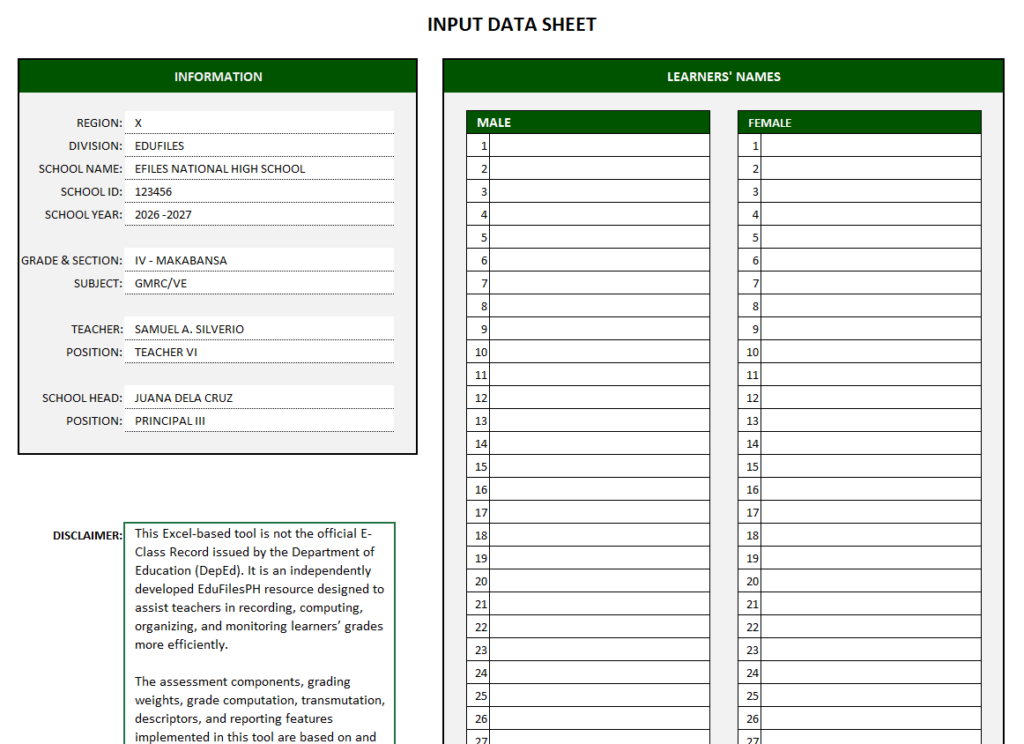
Central Input Data Sheet
Teachers enter the following information only once:
- Region
- Division
- School name
- School ID
- School year
- Grade and section
- Subject
- Teacher’s name and position
- School head’s name and position
- Male learners
- Female learners
The information and learner names automatically appear in the term and summary sheets.
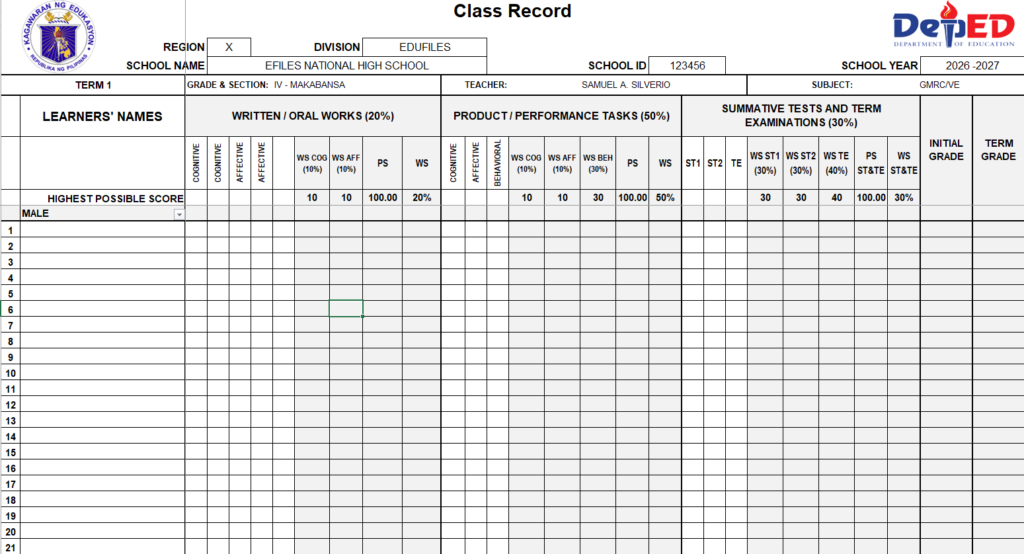
Separate Term Sheets
The workbook includes:
- Term 1
- Term 2
- Term 3
Each sheet contains spaces for:
- Written or Oral Works
- Product or Performance Tasks
- Summative Test 1
- Summative Test 2
- Term Examination
- Initial Grade
- Term Grade
- Descriptor
Domain Selection for Written or Oral Works
The WW section includes a dropdown that allows the teacher to classify an activity as cognitive or affective.
This helps the workbook organize the selected assessment evidence without changing the official 20% WW component.
Dedicated PT Domain Columns
The PT section provides separate scoring areas for cognitive, affective, and behavioral evidence.
Automatic Grade Computation
The workbook automatically computes:
- Percentage Scores
- Weighted Scores
- Initial Grades
- Transmuted Term Grades
- Descriptors
- Final Grades
- Pass or Fail remarks
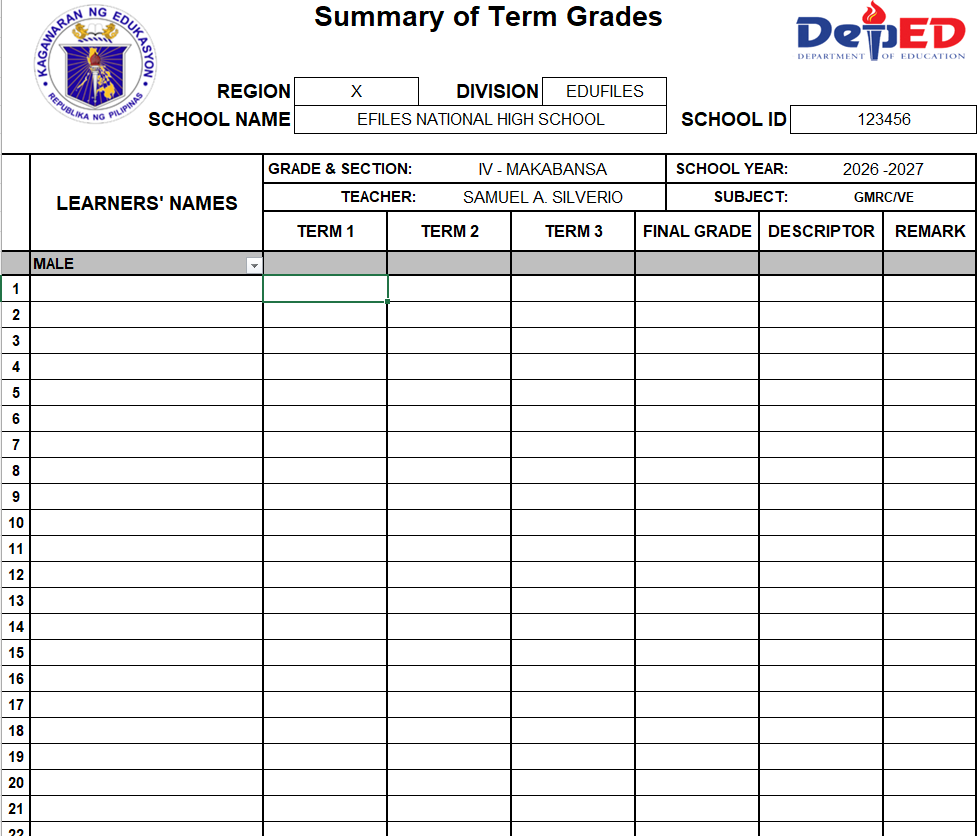
Summary of Grades
The summary sheet displays:
- Term 1 grade
- Term 2 grade
- Term 3 grade
- Final Grade
- Descriptor
- Remark
Learner Capacity
The workbook provides spaces for:
- 50 male learners
- 50 female learners
Class Performance Summary
Each term and the final summary include a count of male, female, and total learners under the following descriptors:
- Advancing
- Benchmarking
- Connecting
- Developing
- Emerging
Protected Formula Cells
Formula cells are protected to help prevent accidental deletion or modification.
Teachers should encode only in the intended input cells.
Macro-Free Excel Format
The file uses the standard .xlsx format and does not require macros.
Workbook Preview
Input Data Sheet
Term Class Record
Summary of Grades
How to Use the GMRC and Values Education E-Class Record
Step 1: Save a Working Copy
Keep one clean backup copy of the original workbook.
Rename the working file using your school, grade, section, and subject.
Example:
GMRC-Grade-5-Makabansa-SY-2026-2027.xlsx
Step 2: Complete the Input Data Sheet
Enter the required school and teacher information.
Select or type the correct subject:
- GMRC for Grades 4–6
- Values Education for Grades 7–10
Step 3: Enter Learner Names
Encode male and female learners in the designated lists.
Do not manually type learner names in the term sheets because the names are automatically pulled from the Input Data sheet.
Step 4: Plan the Term Assessments
Before encoding scores, identify the assessments that will be used for:
- Written or Oral Works
- Product or Performance Tasks
- Summative Tests
- Term Examination
Make sure each assessment is aligned with the learning competency.
Step 5: Classify the WW Activities
Use the dropdown in the WW heading row to classify each activity as:
- Cognitive
- Affective
Select the domain that best represents the primary evidence produced by the activity.
Step 6: Enter the Highest Possible Scores
Encode the correct Highest Possible Score for every assessment administered.
The HPS should match the actual rubric, test, checklist, or scoring guide used by the teacher.
Step 7: Enter Learner Raw Scores
Enter each learner’s actual score only in the designated score cells.
Do not overwrite cells containing formulas.
Step 8: Validate the PT Evidence
Before entering PT scores, confirm that the cognitive, affective, and behavioral scores are supported by appropriate evidence.
Use separate rubrics or clearly identified rubric criteria when necessary.
Step 9: Encode ST and Term Examination Scores
Enter the HPS and learner scores for:
- Summative Test 1
- Summative Test 2
- Term Examination
Step 10: Review Computed Grades
Check the following:
- Percentage Scores
- Weighted Scores
- Initial Grades
- Term Grades
- Descriptors
Spot-check several learners using manual computation before finalizing the class record.
Step 11: Review the Summary of Grades
After completing all three terms, open the Summary of Grades sheet.
Verify the Final Grade, descriptor, and pass or fail remark for each learner.
Fair and Evidence-Based Behavioral Assessment
Behavioral assessment in GMRC and Values Education must be handled carefully because it can easily become subjective.
Use the following safeguards:
Use Observable Indicators
Write indicators that describe actions that can be seen or documented.
Instead of:
“Has a good attitude.”
Use:
“Listens to group members, completes the assigned role, and responds respectfully during the activity.”
Use a Rubric or Checklist
Share the assessment criteria before the task whenever possible.
The criteria should describe different levels of performance clearly.
Collect More Than One Piece of Evidence
Avoid assigning a behavioral score from one incident or one classroom observation.
Collect evidence across several activities or occasions.
Use the Same Criteria for All Learners
All learners should be assessed using the same standards, with appropriate accommodations when needed.
Separate Academic Assessment From Punishment
Do not automatically deduct academic points because of:
- Tardiness
- Absence
- Incomplete uniform
- A disciplinary incident
- Personality differences
- Quietness
- A disagreement unrelated to the competency
Behavioral scores should represent demonstrated learning evidence, not punishment.
Consider Context and Learner Needs
Consider approved accommodations, language needs, disabilities, cultural differences, and other legitimate circumstances that may affect how a learner participates.
Protect Learner Privacy
Do not include unnecessary sensitive information in observation notes.
Record only what is relevant to the competency and assessment criteria.
Provide Constructive Feedback
Tell the learner what was demonstrated well, what needs improvement, and what action may be taken next.
When appropriate, provide another opportunity to demonstrate improvement.
Teacher Validation Checklist
Before finalizing the class record, confirm the following:
- The correct grade level, section, subject, and school year are entered.
- All learner names are correctly encoded in the Input Data sheet.
- Each WW activity is correctly classified as cognitive or affective.
- Every Highest Possible Score matches the actual assessment.
- Raw scores were entered in the correct columns.
- PT scores are supported by rubrics, checklists, outputs, or observation records.
- Behavioral evidence is observable, competency-based, and collected fairly.
- No learner was graded based only on personality, reputation, or one incident.
- Summative tests and the term examination match the approved Table of Specifications.
- The WW, PT, and EX totals were checked.
- Several Initial Grades and Term Grades were manually spot-checked.
- The displayed descriptors match the numerical grades.
- All three term grades appear correctly in the Summary of Grades.
- Final Grades were reviewed before reporting or printing.
- Blank learners do not contain unintended grades.
- The final record has been reviewed, saved, and backed up.
Frequently Asked Questions
Who may use this E-Class Record?
The workbook is intended for:
- GMRC teachers in Grades 4–6
- Values Education teachers in Grades 7–10
Is this an official DepEd E-Class Record?
No. This is an independently developed EduFilesPH resource.
It is designed to help teachers organize and compute grades based on the applicable grading framework, but it is not an official DepEd-issued template.
Are the cognitive, affective, and behavioral percentages official DepEd weights?
No.
The official weights for GMRC and Values Education are:
- WW – 20%
- PT – 50%
- EX – 30%
The domain-related columns and sub-allocations are an EduFilesPH workbook feature for organizing assessment evidence within those official components.
Why are cognitive and affective domains included in WW?
Written and oral activities may provide evidence of both understanding and reflective response.
The teacher selects the domain that best represents the primary evidence produced by each activity.
Why is behavioral evidence placed under PT?
Observable application of values is often best demonstrated through authentic tasks, role-plays, projects, collaboration, and other performances.
These forms of evidence are generally more appropriate under Product or Performance Tasks than under traditional written examinations.
Does the examination component assess behavior?
Examinations primarily provide evidence of knowledge, understanding, reasoning, analysis, and application.
Behavioral learning should normally be supported by observable performance evidence rather than inferred from test answers alone.
Can a learner’s conduct grade or disciplinary record be used automatically as the behavioral score?
No.
A behavioral assessment score should come from transparent criteria and observable evidence connected to the learning competency or task.
Disciplinary action and academic assessment should not be treated as the same process.
Can reflections be graded?
Yes, but the teacher should grade the quality of the required learning evidence.
Possible criteria include:
- Completeness
- Relevance
- Thoughtfulness
- Explanation
- Application of the lesson
- Use of examples
The teacher should not grade whether the learner has the “correct” private feeling or personal belief.
Can the Highest Possible Scores be changed?
Yes.
Teachers should enter the actual HPS used in their assessments, rubrics, summative tests, and term examination.
How is the Final Grade computed?
The workbook averages the learner’s Term 1, Term 2, and Term 3 grades and rounds the result to a whole number.
Can the same workbook be used for GMRC and Values Education?
Yes.
This is a combined GMRC and Values Education workbook. Change the subject, grade, and section information in the Input Data sheet before encoding scores.
Does the file require macros?
No. The workbook uses the standard Microsoft Excel .xlsx format.
Download the Free GMRC/Values Education E-Class Record

Related Resources
You may also explore the following EduFilesPH resources:
[Add internal links to the related EduFilesPH posts.]
Disclaimer
This Excel workbook is an independently developed EduFilesPH resource and is not an official E-Class Record template issued by the Department of Education.
However, its grading structure for GMRC in Grades 4–6 and Values Education in Grades 7–10 is based on the component and domain weights provided in DepEd Order No. 015, s. 2026:
- WW Cognitive – 10%
- WW Affective – 10%
- PT Cognitive – 10%
- PT Affective – 10%
- PT Behavioral – 30%
- Examinations – 30%
The workbook formulas, layout, automation, data-entry system, summaries, and other usability features were developed by EduFilesPH to help teachers apply and organize the prescribed grading structure.
Teachers remain responsible for ensuring that assessment activities are aligned with the curriculum competencies, supported by appropriate scoring tools and evidence, administered fairly, and validated before grades are officially reported.
Official Policy Reference
DepEd Order No. 015, s. 2026
Title: Revised Guidelines on Classroom Assessment, Grading System, and Awards and Recognition for the K to 12 Basic Education Program
Relevant provisions include the sections on:
- Summative assessment
- Written or Oral Works
- Product or Performance Tasks
- Summative Tests and Term Examinations
- Recommended number of assessments
- Weight of grading components
- Transmutation of Initial Grades
- Numerical grades and qualitative descriptors
- Computation of Term Grades and Final Grades
thank you so much for kindness in sharing free automated forms that are accessible for us teachers who are having hard time searching automated suited for our grade levels, More over I would like to to extend my gratitude because you open it freely of charge for those who needed it most especially teachers who are facing economic/financial crisis and struggling, Again thank you and God will return in thousand fold all the extend help and care, concern for your co teachers in DepEd. God bless you
thank you so much