
Computing and summarizing learner grades can take a lot of time, especially when teachers need to consolidate grades from three terms, compute final grades, rank learners, and identify possible Academic Excellence Awardee candidates.
To help teachers save time, EduFilesPH is sharing this free Summary of Grades Template with Ranking and Academic Excellence Awardee Indicator. This Excel-based template is designed for the Three-Term School Calendar and can help class advisers organize learner grades in one clean and automated file.
The template may be used to encode term grades, compute final grades, generate general averages, rank learners, and identify learners who may qualify as Academic Excellence Awardee candidates based on the required grade conditions.
Please remember that this file is a teacher support tool. Final checking, validation, and recognition decisions should still follow the official instructions of the school, division, region, or DepEd.
Resource Information
Resource Type: Summary of Grades Template
File Format: Microsoft Excel file
School Year: SY 2026–2027
Calendar Structure: Three-Term School Calendar
Main Use: Consolidating term grades, computing final grades, ranking learners, and identifying possible Academic Excellence Awardee candidates
Recommended Users: Class advisers, subject teachers, grade-level coordinators, school heads, and school form coordinators
Automation Type: Formula-based Excel template
Available Versions: Grade 4–6, Grade 7–10, SHS 9 Subjects, and SHS 10 Subjects
About This Summary of Grades Template
The Summary of Grades Template is an Excel-based file designed to help teachers consolidate learner grades across the three terms of the school year.
Instead of manually computing final grades and ranking learners one by one, teachers can use this template to organize learner grades, generate averages, and prepare a cleaner class summary.
Depending on the version of the file, the template may include sheets for input data, Term 1, Term 2, Term 3, Final Grade, and helper tables. The file is intended to make grade summary preparation faster, cleaner, and easier to review.
What Is a Summary of Grades?
A Summary of Grades is a consolidated record of learner performance across learning areas. It helps teachers and school personnel review final grades, general averages, ranking, descriptors, and possible awardee indicators.
A properly prepared Summary of Grades may help teachers:
- consolidate learner grades in one file;
- compute final grades per learning area;
- compute the general average;
- rank learners based on final general average;
- identify learners who may qualify for academic recognition;
- prepare records for checking and validation;
- support report card preparation;
- reduce manual computation errors; and
- organize class performance records more efficiently.
Designed for the Three-Term School Calendar
This template is designed for the Three-Term School Calendar. It includes separate areas or sheets for:
- Term 1 grades;
- Term 2 grades;
- Term 3 grades; and
- Final Grade summary.
The final grade is computed using the learner’s grades from the three terms. The general average is then computed using the learner’s final grades across the required learning areas.
Important Update on Academic Excellence Awardees
Please take note of this important rule when identifying learners who may be considered as Academic Excellence Awardee candidates:
Candidates for awards must have a General Average of 95 or higher and no final grade below 85 in any learning area.
This means that a learner should not be marked as a possible Academic Excellence Awardee candidate based only on the General Average.
Both conditions should be checked:
| Requirement | Condition |
|---|---|
| General Average | 95 or higher |
| Final Grade per Learning Area | No grade below 85 |
For example, if a learner has a General Average of 95 but has one final grade of 84 in any learning area, the learner should not be automatically marked as a candidate based on this condition.
This is why teachers should review both the General Average and the individual final grades before finalizing the list of learners for academic recognition.
Formula Guide for Teachers
The template is automated, but it is still useful for teachers to understand the basic computations behind the file.
Final Grade per Learning Area
The final grade may be computed using the three term grades.
Final Grade = Average of Term 1, Term 2, and Term 3Sample Excel formula:
=ROUND(AVERAGE(Term1, Term2, Term3),0)General Average
The General Average is computed using the learner’s final grades across the learning areas.
General Average = Average of Final Grades in all Learning AreasSample Excel formula:
=ROUND(AVERAGE(FinalGradeRange),0)Ranking
The ranking may be based on the General Average of learners in the class.
Sample Excel formula:
=RANK.AVG(GeneralAverageCell,GeneralAverageRange,0)or
=RANK.EQ(GeneralAverageCell,GeneralAverageRange,0)The exact formula may vary depending on the template version and the Excel setup.
Academic Excellence Awardee Candidate Indicator
The updated condition should check both the General Average and the lowest final grade in the learning areas.
Sample Excel formula:
=IF(AND(GeneralAverage>=95,MIN(FinalGradeRange)>=85),"✔","")Example for a row where the learner’s final grades are in columns C to J and the General Average is in column M:
=IF(AND(M16>=95,MIN(C16:J16)>=85),"✔","")This means the learner will only be marked if:
- the General Average is 95 or higher; and
- all final grades in the learning areas are 85 or higher.
Why This Update Matters
The Academic Excellence Awardee indicator should not rely on the general average alone. A learner may have a high average, but one low final grade in a learning area may affect eligibility.
This updated condition helps make the template more accurate and useful for teachers because it checks both overall performance and minimum grade requirement.
Teachers should still validate the final list manually and follow the school’s official process before recognizing learners.
Key Features of the Summary of Grades Template
The actual features may vary depending on the version, but the template may include:
- editable learner list;
- school and class information section;
- Term 1, Term 2, and Term 3 grade sheets;
- final grade computation;
- general average computation;
- learner ranking;
- descriptor column;
- Academic Excellence Awardee candidate indicator;
- helper tables;
- clean printable summary format;
- Grade 4–6 version;
- Grade 7–10 version;
- SHS 9 Subjects version;
- SHS 10 Subjects version; and
- formula-based automation.
What’s Included in the File?
Depending on the selected version, the file may include the following sheets:
- Input Data;
- Term 1;
- Term 2;
- Term 3;
- Final;
- Helper.
These sheets help teachers encode data, organize term grades, compute final grades, and generate a final summary for checking.
Available Template Versions
You may download the version that matches your class or grade level.
Available versions may include:
- Summary of Grades for Grade 4–6;
- Summary of Grades for Grade 7–10;
- Summary of Grades for SHS with 9 Subjects; and
- Summary of Grades for SHS with 10 Subjects.
Choose the version that matches the number of learning areas or subjects you need to summarize.
How to Use the Summary of Grades Template
- Download the correct template version from the download section.
- Open the file using Microsoft Excel.
- Save a backup copy before encoding actual learner data.
- Encode the school name, grade level, section, adviser name, and other required details.
- Enter the learner names carefully.
- Encode the Term 1 grades.
- Encode the Term 2 grades.
- Encode the Term 3 grades.
- Check the generated final grades.
- Review the General Average.
- Check the ranking column.
- Review the Academic Excellence Awardee candidate indicator.
- Validate the results before printing, submitting, or using the file for recognition purposes.
Important Excel Reminders
Before using the file, it is best to prepare a clean working copy. This helps protect your original file and prevents accidental data loss.
Here are some reminders:
- Use Microsoft Excel for best compatibility.
- Keep one blank copy of the original template.
- Duplicate the file before encoding actual learner data.
- Encode only in the editable input areas.
- Do not type over formula cells.
- Do not delete hidden rows, hidden columns, helper tables, or computation areas.
- Check all term grades before reviewing final results.
- Review the General Average and individual final grades.
- Validate the Academic Excellence Awardee candidate indicator manually.
- Contact EduFilesPH if you notice any error, inconsistency, or formula issue.
Important Reminder About the Awardee Indicator
The Academic Excellence Awardee column should be treated as a candidate indicator only, not the final official list of awardees.
Teachers and school personnel should still check:
- General Average;
- final grade per learning area;
- required grade conditions;
- official school instructions;
- learner records;
- adviser validation;
- grade-level checking; and
- school recognition procedures.
If the downloaded file only checks for a General Average of 95 or higher, please update to the latest version or message EduFilesPH so we can review the file and provide the corrected version when available.
Teacher Tip
Use the Summary of Grades not only for ranking but also for checking learner performance across subjects.
Before finalizing the list, review learners who have high averages but may have one learning area below the required grade condition. This helps prevent incorrect identification of Academic Excellence Awardee candidates.
It is also helpful to save one file per section and keep a separate backup copy before editing formulas or printing the final summary.
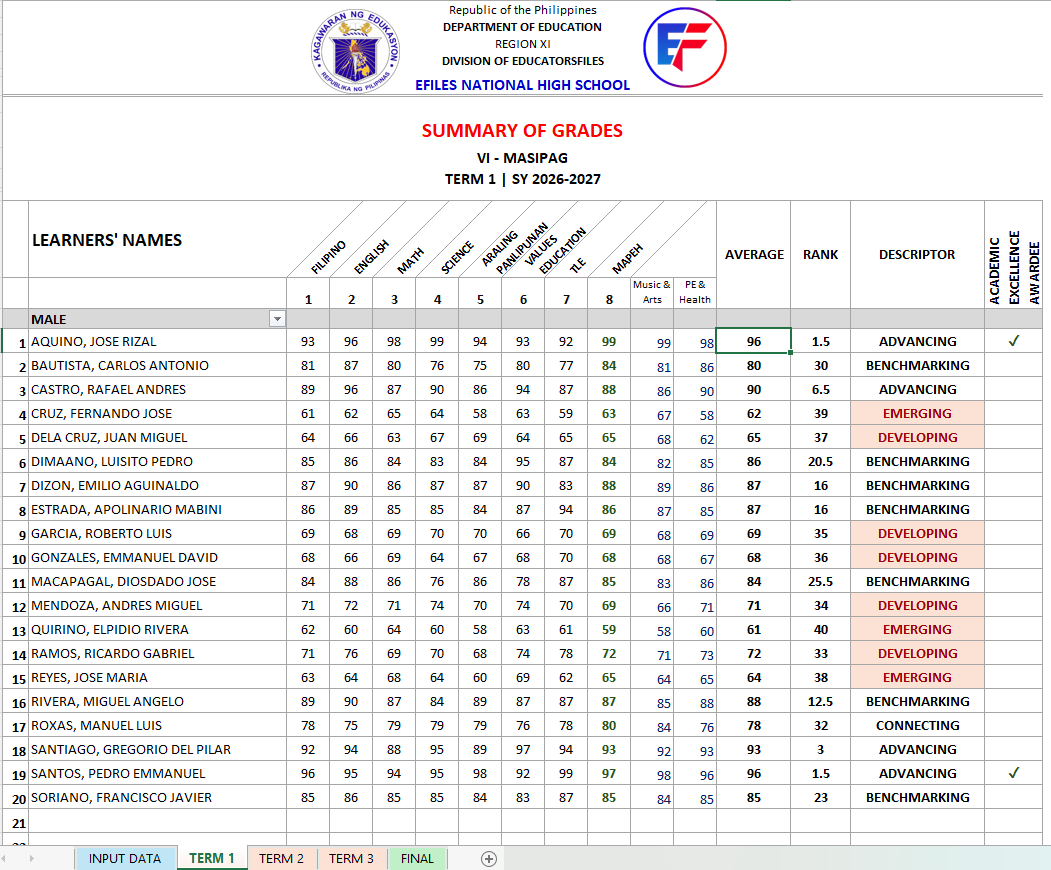
Preview of the File
Below is a preview of the Summary of Grades Template. The actual file may contain additional sheets, formulas, helper tables, or printable sections depending on the version provided.
👉 Need the Unprotected Version?
🚀 💡 If you want to avail the UNPROTECTED version of the Summary of Grades, message our Facebook Page with: “Unprotected Summary of Grades”
The unprotected version may be useful for users who need to study, adjust, or customize the formulas and helper tables. However, please make sure that any changes are carefully reviewed because editing formulas may affect the accuracy of the results.
📲 Tap or scan the QR code to message us now.

Important Reminder
This Summary of Grades Template is shared to help teachers save time in preparing grade summaries. Please review the file, encode only in the correct input areas, and check the generated results before using them for school records.
If you notice any error, inconsistency, formula issue, or mismatch while using the file, please message or contact EduFilesPH so we can review the concern and update the template when needed.
Please do not repost, resell, or claim this file as your own. You may share the official EduFilesPH post link instead so other teachers can access the original source.
Frequently Asked Questions
Is this Summary of Grades Template free?
Yes. This post provides free Summary of Grades templates for teachers.
Is this designed for the Three-Term School Calendar?
Yes. The template is designed for the Three-Term School Calendar and includes Term 1, Term 2, Term 3, and Final Grade sections.
What versions are available?
Available versions may include Grade 4–6, Grade 7–10, SHS with 9 Subjects, and SHS with 10 Subjects.
Does the template compute final grades automatically?
Yes. The template may compute final grades automatically based on the encoded term grades.
Does the template include ranking?
Yes. The template may include a ranking column based on the computed General Average.
Does the template identify Academic Excellence Awardee candidates?
Yes. The template may include an indicator for possible Academic Excellence Awardee candidates. However, this should be treated as a candidate indicator only and should still be checked manually.
What is the updated condition for Academic Excellence Awardee candidates?
Candidates should have a General Average of 95 or higher and no final grade below 85 in any learning area.
Why is the “no final grade below 85” condition important?
This condition ensures that a learner is not identified based only on a high General Average. All individual final grades must also meet the required minimum condition.
Can I use this for official recognition?
This file can help prepare and review grade summaries, but final recognition should still follow official school checking, validation, and approval procedures.
Can I edit the formulas?
The free version may contain formula cells that should not be edited unless you understand how the workbook works. If you find any formula issue, please contact EduFilesPH so we can review and update the file if needed.
Can I use this in Google Sheets?
Microsoft Excel is recommended. Some formulas, formatting, protection settings, or workbook features may not work exactly the same in Google Sheets.
What should I check before printing or submitting?
Check learner names, term grades, final grades, General Average, ranking, descriptors, and Academic Excellence Awardee candidate indicators. Also follow your school’s official checking process.
What should I do if I find an error or inconsistency?
Please message or contact EduFilesPH. Include the file version, screenshot if possible, and a short explanation of the issue so we can review it properly.
Is this an official DepEd template?
No. This is not an official DepEd-issued template. It is an automated teacher resource created to help teachers prepare grade summaries more conveniently.
Can I share this file with other teachers?
You may share the official EduFilesPH post link. Please do not repost, resell, or claim the file as your own.
Related Resources
You may also check these related EduFilesPH resources:
- Free Three-Term Electronic Class Record for SY 2026–2027
- Automated Test Result Analysis Template
- Automated SF9 with Consolidated Grades Template
- Automated SF2 for SY 2026–2027
- Automated SF8 Learner’s Basic Health and Nutrition Report
- Free Editable Attendance Sheets for SY 2026–2027
- School Forms Cover Template
- Free Download: SFCR1 and SFCR2 Excel File
Download the Summary of Grades Templates
You may download the available Summary of Grades templates below. Please choose the file that matches your grade level or subject setup.
Available Files

Disclaimer
EduFilesPH shares educational templates and resources to help teachers and school personnel. The files are provided as supplementary tools and should be used with proper checking and school guidance.
This Summary of Grades Template is not an official DepEd-issued file. It is a modified and automated teacher resource created for convenience in preparing grade summaries, ranking, and candidate indicators.
The Academic Excellence Awardee indicator should not be treated as the final official list of awardees. Teachers and school personnel must still validate the General Average, individual final grades, learner records, and school recognition requirements before finalizing any list.
EduFilesPH is not officially affiliated with the Department of Education unless clearly stated. Always refer to official DepEd issuances, school instructions, grading policies, recognition guidelines, and division or regional directions when preparing official school records and recognition documents.
thank you very much!may god bless you more!
love it..thank you very much