
Preparing school forms for checking can be time-consuming, especially when schools need to review learner records, validate supporting documents, check inconsistencies, and prepare reports for school, district, and division-level checking.
To help teachers, school heads, and checking committees, EduFilesPH is sharing free SFCR1 and SFCR2 Excel Templates. These templates are designed to help organize the School Forms Checking Report and Consolidated District School Forms Checking Report in a cleaner and more convenient Excel format.
These templates are based on DepEd Order No. 11, s. 2018, also known as the Guidelines on the Preparation and Checking of School Forms. This issuance provides the standard process and procedures for the preparation, evaluation, and updating of school forms.
Please remember that these files are support templates only. Schools should still follow the official instructions of DepEd, the Schools Division Office, district supervisors, school heads, and checking committees when preparing and validating school forms.
Resource Information
Resource Type: School Forms Checking Report Templates
Related Forms: SFCR1 and SFCR2
File Format: Microsoft Excel file
Basis: DepEd Order No. 11, s. 2018
Main Use: School forms checking, validation, reporting, and consolidation
Recommended Users: Class advisers, school heads, school checking committees, PSDS, district checking committees, and school form coordinators
About the SFCR1 and SFCR2 Templates
The SFCR1 and SFCR2 templates are Excel-based files intended to help schools prepare checking reports more conveniently.
The templates may include sections for learner records reviewed, records with inconsistencies or incomplete supporting documents, transferred-in or moved-in learners, and technical assistance or observations during checking.
Instead of manually creating tables from scratch, users can encode the necessary information in the appropriate cells and allow the file to generate totals and summary values depending on the version of the template.
Basis of the Templates
These templates are based on DepEd Order No. 11, s. 2018, which provides the guidelines on the preparation and checking of school forms.
The order explains that school forms checking is done to help ensure the quality, consistency, and accuracy of learner information. It also provides standard processes for checking, validating, and updating school forms at the school and division levels.
The templates shared in this post are created to support the checking process by providing a cleaner Excel layout for the report forms. They do not replace official DepEd instructions and should be used together with proper validation and checking procedures.
What Is SFCR1?
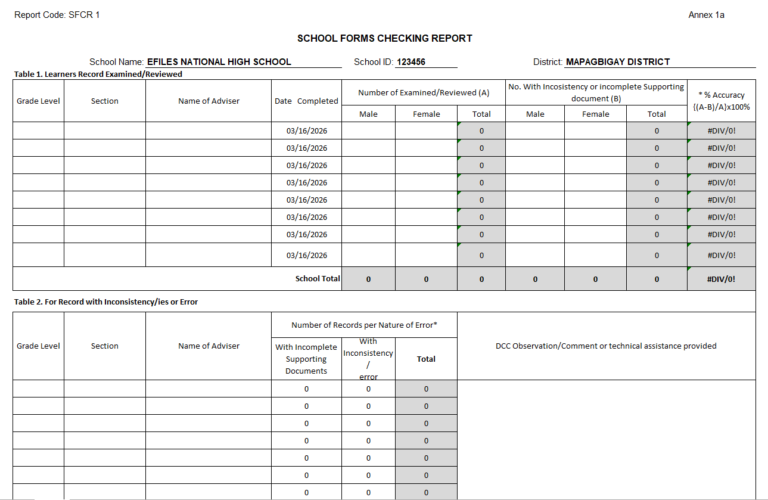
SFCR1 refers to the School Forms Checking Report.
This report is used to document the results of the review and checking of school forms. It is commonly used at the school level and may reflect the number of learner records examined, inconsistencies found, incomplete supporting documents, and observations or technical assistance provided during checking.
The uploaded SFCR1 template includes sections such as:
- learner records examined or reviewed;
- number of male and female records checked;
- number of records with inconsistencies or incomplete supporting documents;
- computed percentage accuracy;
- records with errors or inconsistencies;
- transferred-in or moved-in learners;
- transferred-in or moved-in learners without Form 137 or SF10; and
- signature and checking committee information.
What Is SFCR2?
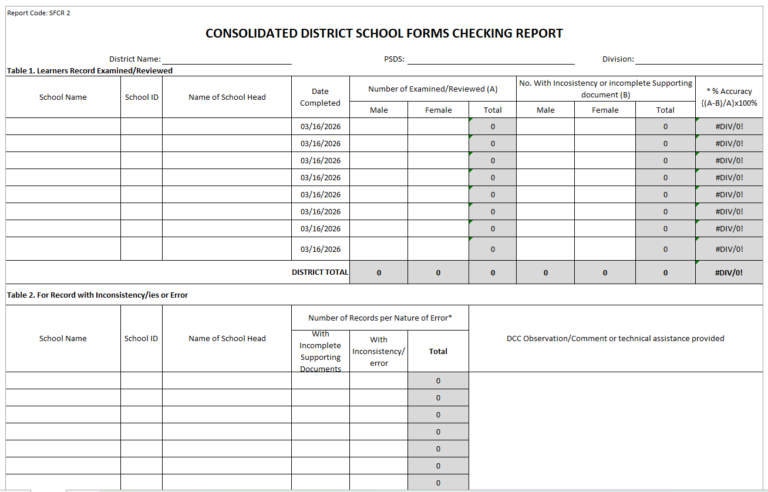
SFCR2 refers to the Consolidated District School Forms Checking Report.
This report is used to consolidate checking results from schools within a district. It may include school names, school IDs, school heads, number of records examined, inconsistencies found, and district-level summaries.
The uploaded SFCR2 template includes sections such as:
- district name;
- PSDS;
- division;
- school names;
- school IDs;
- school heads;
- learner records examined or reviewed;
- number of records with inconsistencies or incomplete supporting documents;
- computed percentage accuracy;
- records with errors or inconsistencies;
- transferred-in or moved-in learners;
- transferred-in or moved-in learners without Form 137 or SF10; and
- district-level signatories.
Difference Between SFCR1 and SFCR2
| Form | Main Purpose | Common User |
|---|---|---|
| SFCR1 | Records the result of school forms checking at the school level | School Checking Committee, school head, class advisers |
| SFCR2 | Consolidates school forms checking reports at the district level | PSDS, District Checking Committee, district or division personnel |
In simple terms, SFCR1 is usually prepared at the school level, while SFCR2 is used for district-level consolidation.
Why These Templates May Be Useful
School forms checking involves several details that need to be accurate and consistent. A prepared Excel template can help organize the process and reduce repetitive formatting work.
These SFCR templates may help users:
- organize school forms checking data;
- encode learner records reviewed;
- tally male, female, and total records;
- identify records with inconsistencies;
- record incomplete supporting documents;
- monitor transferred-in or moved-in learners;
- compute percentage accuracy;
- prepare school and district summaries;
- reduce manual table formatting;
- prepare cleaner print-ready reports; and
- keep checking records in one Excel file.
Key Features of the SFCR Templates
The actual features may vary depending on the file version, but the templates may include:
- ready-made SFCR1 layout;
- ready-made SFCR2 layout;
- school information fields;
- district and division information fields;
- school ID and school head fields;
- learner record review tables;
- male, female, and total columns;
- inconsistency and incomplete document columns;
- automatic total rows;
- percentage accuracy computation;
- transferred-in or moved-in learner tables;
- Form 137 or SF10 monitoring section;
- checking committee signatory section;
- print-ready layout; and
- Excel-based formatting.
Important Formula Used in the Template
One of the important values in the SFCR template is the Percentage Accuracy.
The template may use this formula:
| Data | Meaning |
|---|---|
| A | Number of learner records examined or reviewed |
| B | Number of records with inconsistency or incomplete supporting document |
Formula:
Percentage Accuracy = ((A - B) / A) × 100Example:
Number of records examined/reviewed: 100
Number with inconsistency or incomplete document: 5

Percentage Accuracy = ((100 - 5) / 100) × 100
Percentage Accuracy = 95%
This helps checking committees see how many learner records were reviewed without reported inconsistencies or incomplete supporting documents.
What Data May Be Encoded in SFCR1?
The SFCR1 template may require information such as:
- school name;
- school ID;
- district;
- grade level;
- section;
- name of adviser;
- date completed;
- number of learner records examined or reviewed;
- number of male learner records;
- number of female learner records;
- number of records with incomplete supporting documents;
- number of records with inconsistencies or errors;
- transferred-in or moved-in learners;
- learners without Form 137 or SF10; and
- observations or technical assistance provided.
What Data May Be Encoded in SFCR2?
The SFCR2 template may require information such as:
- district name;
- PSDS;
- division;
- school name;
- school ID;
- school head;
- date completed;
- number of learner records examined or reviewed;
- number of records with inconsistencies;
- number of records with incomplete supporting documents;
- district total;
- transferred-in or moved-in learner details;
- school-level checking summary; and
- district-level consolidation details.
Suggested Documents to Review During Checking
The actual documents to be checked may depend on the grade level, learner status, and instructions from DepEd or the Schools Division Office.
Documents commonly reviewed during school forms checking may include:
- SF1 or School Register;
- SF2 or Daily Attendance Report of Learners;
- SF5 or Report on Promotion and Level of Proficiency;
- SF6 or Summary Report on Promotion and Level of Proficiency;
- SF9 or Learner’s Progress Report Card;
- SF10 or Learner’s Permanent Academic Record;
- PSA Birth Certificate or equivalent document;
- Form 137 for transferred learners;
- completion certificate when applicable;
- ALS, PEPT, PVT, or A&E-related documents when applicable; and
- other school records required by the checking committee.
Teachers and school personnel should always follow the latest checking instructions from their school and division.
How to Use the SFCR Excel Templates
- Download the SFCR1 and/or SFCR2 template from the download section.
- Open the file using Microsoft Excel.
- Save a backup copy before encoding actual checking data.
- Encode the required school, district, or division information.
- Enter the required learner record checking data.
- Fill in the number of records examined or reviewed.
- Encode records with inconsistencies or incomplete supporting documents.
- Check the computed totals and percentage accuracy.
- Review transferred-in or moved-in learner information.
- Add observations, comments, or technical assistance notes when needed.
- Check the print layout before printing.
- Validate the report with the assigned checking committee or approving personnel.
Important Excel Reminders
Before using the file, it is best to prepare a clean working copy.
Here are some reminders:
- Use Microsoft Excel for best compatibility.
- Keep one blank copy of the original template.
- Duplicate the file before encoding checking data.
- Encode only in the editable input areas.
- Do not delete formula cells, hidden rows, columns, or computation areas.
- Check the number of records reviewed before relying on percentage accuracy.
- Review totals for male, female, and overall records.
- Check print preview before printing.
- Follow the required paper size or printing instructions from your school or division.
- Contact EduFilesPH if you notice any error, inconsistency, or formula issue.
Printing Reminder
Before printing, check the page setup and print preview. Depending on your printer and Excel version, you may need to adjust scaling.
Recommended print checks:
- fit all columns on one page;
- check orientation;
- check paper size required by your school or division;
- review margins;
- make sure signatory lines are visible;
- confirm that all tables are complete; and
- print a test copy if needed.
Teacher Tip
Keep one master copy of the SFCR templates and create a separate working file for each school year, district, or checking schedule.
You may use a clear file name such as:
SFCR1_EFILES_NHS_SY2026-2027.xlsxor
SFCR2_Mapagbigay_District_SY2026-2027.xlsxThis helps avoid confusion when handling multiple versions of the report.
Preview of the Templates
Below is a preview of the SFCR1 and SFCR2 Excel templates. The actual file may contain additional formatting, formulas, signatory sections, and printable layouts depending on the version provided.
Important Reminder
These SFCR1 and SFCR2 Excel templates are shared to help teachers and school personnel save time in preparing school forms checking reports. Please review the files, encode only in the correct input areas, and check all generated totals before using the reports for official checking.
If you notice any error, inconsistency, formula issue, or mismatch while using the files, please message or contact EduFilesPH so we can review the concern and update the templates when needed.
Please do not repost, resell, or claim these files as your own. You may share the official EduFilesPH post link instead so other teachers and school personnel can access the original source.
Frequently Asked Questions
What is SFCR1?
SFCR1 is the School Forms Checking Report. It is used to document the result of school forms checking at the school level.
What is SFCR2?
SFCR2 is the Consolidated District School Forms Checking Report. It is used to consolidate school forms checking results from schools within a district.
What is the basis of these templates?
The templates are based on DepEd Order No. 11, s. 2018, which provides the guidelines on the preparation and checking of school forms.
Are these templates free to download?
Yes. This post provides free SFCR1 and SFCR2 Excel templates.
Are these official DepEd templates?
No. These are not official DepEd-issued files. They are supplementary Excel templates created to help users prepare checking reports more conveniently.
Can I edit the files?
The input areas may be editable. Formula cells and important layout sections should not be changed unless you understand how the template works.
Can I use the templates in Google Sheets?
Microsoft Excel is recommended. Some formulas, merged cells, layout settings, and print formatting may not work the same way in Google Sheets.
What is Percentage Accuracy?
Percentage Accuracy shows the percentage of reviewed learner records without reported inconsistency or incomplete supporting document. The formula is:
((A - B) / A) × 100where A is the number of records examined or reviewed, and B is the number of records with inconsistency or incomplete supporting document.
What should I check before submitting the SFCR?
Check the school information, learner records reviewed, male and female totals, records with inconsistencies, incomplete supporting documents, transferred-in or moved-in learners, Form 137 or SF10 details, observations, and signatory sections.
Can this file replace the official checking process?
No. The file is only a support template. Users should still follow the official checking process and instructions from DepEd, the division office, district office, school head, and checking committee.
What should I do if I find a formula error?
Please message or contact EduFilesPH. Include the file name, screenshot if possible, and a short explanation of the issue so we can review it properly.
Can I share these templates with other teachers?
You may share the official EduFilesPH post link. Please do not repost, resell, or claim the files as your own.
Related Resources
You may also check these related EduFilesPH resources:
- Automated SF2 for SY 2026–2027
- Automated SF8 Learner’s Basic Health and Nutrition Report
- Summary of Grades Template with Ranking and Awardee Indicator
- Automated Test Result Analysis Template
- Free Three-Term Electronic Class Record for SY 2026–2027
Download the SFCR1 and SFCR2 Excel Templates
You may download the available SFCR Excel templates below. Please review the files, encode only in the correct input areas, and validate all entries before using them for actual checking records.
Available Files

Source Reference
This post was prepared with reference to DepEd Order No. 11, s. 2018, titled Guidelines on the Preparation and Checking of School Forms.
Users should always refer to the official DepEd issuance and the latest school, district, division, or regional instructions when preparing official school forms and checking reports.
Disclaimer
EduFilesPH shares educational templates and resources to help teachers and school personnel. The files are provided as supplementary tools and should be used with proper checking and school guidance.
These SFCR1 and SFCR2 Excel templates are not official DepEd-issued files. They are modified and formatted teacher-support resources created for convenience in preparing school forms checking reports.
Users are advised to validate all entries, totals, formulas, and outputs according to their school’s official policies and checking requirements. EduFilesPH is not officially affiliated with the Department of Education unless clearly stated. Always refer to official DepEd issuances, school instructions, checking committee guidelines, and division or regional directions when preparing official school records.