
Preparing teacher portfolio documents can take time, especially when teachers need to gather their Means of Verification, organize supporting files, and provide proof of completed school requirements.
One document that teachers may need to include in their PMES or RPMS-related portfolio is proof of completion of the Electronic Self-Assessment Tool, commonly known as E-SAT.
To help teachers and School ICT Coordinators prepare a clean and formal certification, EduFilesPH is sharing this free editable E-SAT Completion Certificate Template. This template can be customized with the teacher’s name, school details, school year, date, and signatories.
Please remember that this template is a support resource only. Teachers should still follow the official instructions of their school, school head, ICT coordinator, PMES focal person, or division office regarding the required documents for portfolio checking.
Resource Information
Resource Type: E-SAT Completion Certificate Template
File Format: Editable Word document
Main Use: Certification of E-SAT completion
Recommended Users: Teachers, School ICT Coordinators, PMES focal persons, school heads, and administrative staff
Suggested Paper Size: A4 or school-preferred certificate size
What Is an E-SAT Completion Certificate?
An E-SAT Completion Certificate is a simple certification that may be issued to a teacher after completing the Electronic Self-Assessment Tool.
It serves as a school-level document showing that the teacher has completed or submitted the required E-SAT information based on the school’s checking process.
In many schools, this type of certification is prepared or verified by the School ICT Coordinator and noted by the School Head or another authorized personnel.
Why This Certificate May Be Useful
Teachers often need to organize proof of completion, participation, and compliance for their portfolio. A properly prepared certificate can help make the documentation cleaner and easier to verify.
This E-SAT Completion Certificate Template may help teachers and schools:
- provide formal proof of E-SAT completion;
- organize PMES or RPMS-related MOVs;
- avoid relying only on screenshots or informal notes;
- prepare certificates for multiple teachers;
- support school-level checking and documentation;
- keep a clean record of completed submissions;
- make portfolio documents more professional; and
- save time in preparing repeated certificate layouts.
About This Editable Template
This template is designed as a ready-to-edit certificate for teachers who completed the E-SAT.
Depending on the version of the file, the template may include:
- certificate title;
- teacher name placeholder;
- school year placeholder;
- date of completion or issuance;
- school name;
- certification statement;
- School ICT Coordinator signatory line;
- School Head or Principal signatory line;
- editable text fields; and
- clean printable layout.
Teachers and coordinators may customize the wording based on school preference.
Who Can Use This Template?
This template may be useful for:
- classroom teachers;
- Teacher I-III;
- Teacher IV-VII;
- Master Teachers;
- School ICT Coordinators;
- PMES or RPMS focal persons;
- school heads;
- administrative staff; and
- personnel assigned to prepare teacher portfolio documents.
The template is generic enough to be edited based on teacher rank, school context, and local instructions.
Suggested Use in PMES or RPMS Portfolio
The E-SAT Completion Certificate may be placed in the portfolio section where teachers keep documents related to professional reflection, self-assessment, development planning, or school-required compliance documents.
Teachers may include it together with other supporting documents such as:
- E-SAT completion screenshot, if required;
- Individual Development Plan-related documents;
- PMES portfolio cover or divider;
- professional development records;
- certificates of participation;
- LAC session records; and
- other MOVs required by the school.
Always follow the official arrangement required by your school.
Key Features of the Template
This E-SAT Completion Certificate Template may include the following features:
- editable Microsoft Word format;
- clean and professional certificate layout;
- easy-to-update teacher name and school details;
- editable date and school year;
- space for School ICT Coordinator signature;
- space for School Head or Principal signature;
- suitable for printing;
- useful for individual or batch preparation;
- simple layout for school-level certification; and
- easy customization based on school needs.
How to Use the E-SAT Completion Certificate Template
- Download the editable template from the download section.
- Open the file using Microsoft Word.
- Save a backup copy before editing.
- Replace the sample school name with your official school name.
- Enter the teacher’s complete name.
- Edit the school year and date of issuance.
- Update the signatory names and positions.
- Review the wording based on your school’s preferred format.
- Print the certificate or save it as PDF.
- Have it signed by the assigned personnel.
- Add the signed copy to the teacher’s PMES or RPMS portfolio if required.
Important Editing Reminders
Before printing or issuing the certificate, check all details carefully.
Review the following:
- teacher name;
- school name;
- school year;
- date of issuance;
- certificate wording;
- signatory names;
- positions or designations;
- spacing and alignment;
- school logo or letterhead, if added;
- paper size; and
- print preview.
For a cleaner output, it is best to use your school’s official letterhead or add your school logo if allowed.
Suggested Certificate Wording
You may use or adjust the following wording based on your school’s format:
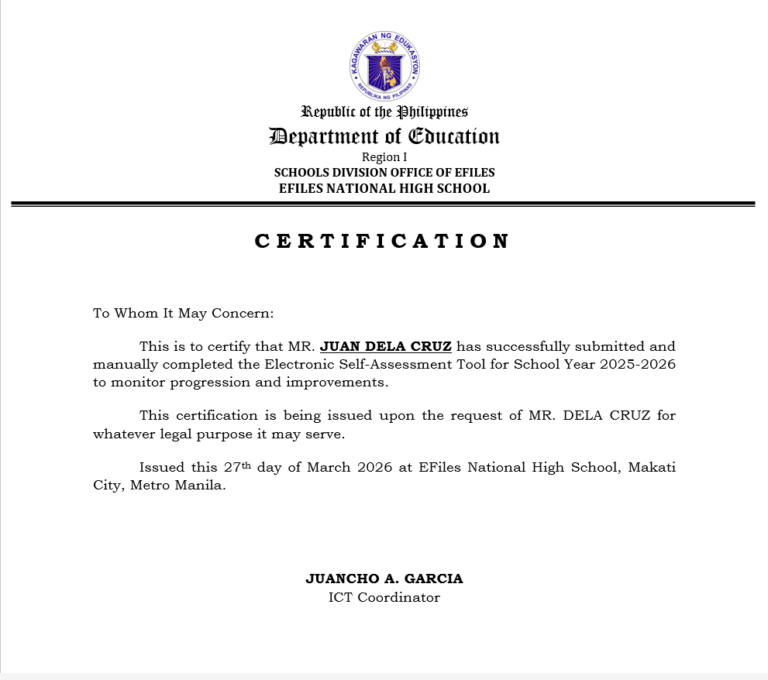
This is to certify that [Teacher’s Name] has completed the Electronic Self-Assessment Tool (E-SAT) for School Year [School Year] as verified by the School ICT Coordinator.

This certification is issued for documentation and portfolio purposes.
Schools may revise the wording depending on their official checking or certification process.
Portfolio Tip
If you are preparing an e-portfolio, scan the signed certificate clearly or save it as a high-quality PDF.
Recommended tips:
- scan at readable quality;
- avoid blurry photos;
- crop the document properly;
- save the file using a clear file name;
- place it under the correct portfolio section; and
- keep both the editable and signed copies.
Suggested file name:
E-SAT_Completion_Certificate_Juan_Dela_Cruz_SY2025-2026.pdfImportant Reminder
This template only helps with certificate preparation. It does not automatically verify whether a teacher has completed the E-SAT.
Before issuing or using the certificate, the School ICT Coordinator or assigned personnel should confirm that the teacher has actually completed the required E-SAT process based on the school’s official records.
If your school has a different required format, use the official school format instead.
Preview of the Template
Below is a preview of the editable E-SAT Completion Certificate Template.
Frequently Asked Questions
Is this E-SAT Completion Certificate Template free?
Yes. This template is shared for free to help teachers and School ICT Coordinators prepare documentation more conveniently.
What file format is the template?
The template is provided in editable Word format.
Can I edit the teacher name and school details?
Yes. You can edit the teacher name, school name, school year, date, and signatories.
Who should prepare the certificate?
In many schools, the certificate may be prepared or verified by the School ICT Coordinator or the assigned personnel handling E-SAT completion records.
Who should sign the certificate?
The certificate may include signature lines for the School ICT Coordinator and the School Head or Principal. However, the actual signatories should follow your school’s instructions.
Is this certificate required?
Requirements may vary depending on the school. Some schools may ask for proof of E-SAT completion as part of portfolio documentation, while others may use a different verification process.
Can this be used for PMES or RPMS portfolio?
Yes. It may be used as a supporting document or MOV if your school accepts it as proof of E-SAT completion.
Is this an official DepEd template?
No. This is not an official DepEd-issued template. It is an editable support template created to help teachers and schools prepare documentation more easily.
Can I add our school logo?
Yes. You may add your school logo or letterhead if your school allows it.
Can I use this for all teacher positions?
Yes. The template is generic and may be edited for Teacher I-III, Teacher IV-VII, Master Teachers, and other teaching positions.
Can I convert it to PDF?
Yes. After editing, you may save or export the file as PDF for printing, signing, or portfolio upload.
What should I do if I find an error in the template?
Please message or contact EduFilesPH so we can review and update the file if needed.
Related Resources
You may also check these related EduFilesPH resources:
- PMES Portfolio Templates SY 2025–2026
- Free Editable Communication Log for PMES Objective 12
- Automated Test Result Analysis Template
- Automated SF8 Learner’s Basic Health and Nutrition Report
- School Forms Cover Template
- Summary of Grades Template with Ranking and Awardee Indicator
Download the Editable E-SAT Completion Certificate Template
You may download the editable E-SAT Completion Certificate Template using the button below. Please review and customize the file based on your school’s required format before printing or using it for portfolio documentation.
Available File

Disclaimer
EduFilesPH shares educational templates and resources to help teachers and school personnel. The files are provided as supplementary tools and should be used with proper checking and school guidance.
This E-SAT Completion Certificate Template is not an official DepEd-issued certificate. It is an editable teacher-support resource created for convenience in preparing school-level documentation.
Users are advised to validate all details, wording, signatures, and portfolio requirements according to their school’s official policies and instructions. EduFilesPH is not officially affiliated with the Department of Education unless clearly stated. Always follow official school, district, division, or regional instructions when preparing PMES, RPMS, or teacher portfolio documents.