
Analyzing test results is an important part of teaching and assessment. After giving a quiz, summative test, quarterly assessment, or periodical examination, teachers need to know which items were answered correctly by most learners and which items may need reteaching or follow-up discussion.
To help teachers save time, EduFilesPH is sharing this free Test Item Analysis Template with Table of Mastery. This Excel-based template can help teachers organize item placements, count correct responses, compute the percentage of correct responses, and identify mastery remarks for each test item.
This template is useful for teachers who want a simple and organized way to review assessment results and use the data for remediation, enrichment, and instructional planning.
Please remember that this file is a teacher support tool. Teachers should still follow their school’s assessment procedures, checking process, and reporting requirements.
Resource Information
Resource Type: Test Item Analysis Template
Related Tool: Table of Mastery Level
File Format: Microsoft Excel file
Main Use: Analyzing item performance and mastery level
Recommended Users: Subject teachers, class advisers, department heads, and school testing coordinators
About This Test Item Analysis Template
The Test Item Analysis Template is an Excel-based file designed to help teachers review how learners performed in each test item.
Instead of only looking at total scores, teachers can use this template to check which items were easy, difficult, or not yet mastered by the class. This helps teachers identify learning competencies that may need follow-up instruction.
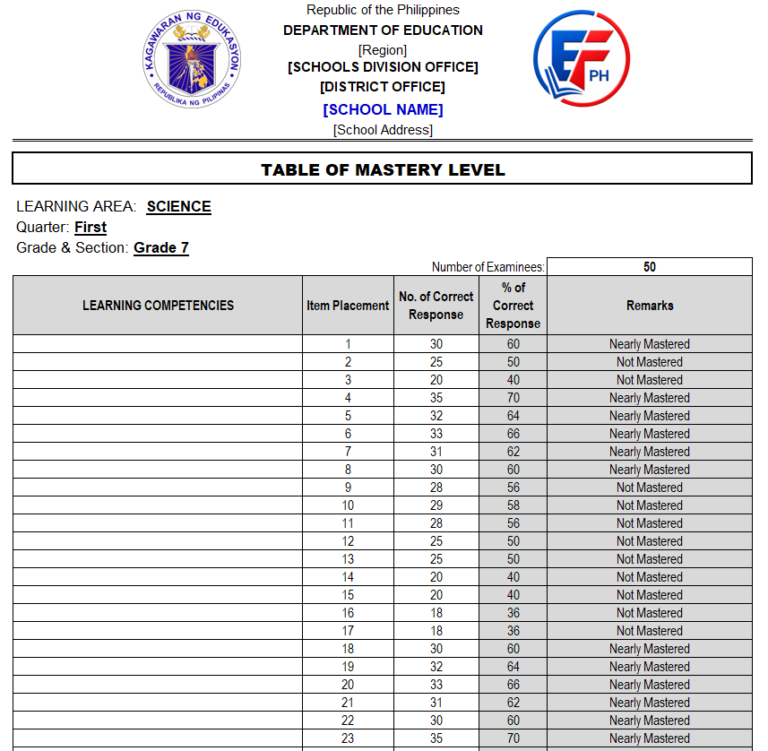
The uploaded template includes a Table of Mastery Level with columns for:
- learning competencies;
- item placement;
- number of correct responses;
- percentage of correct responses; and
- remarks.
It also includes fields for learning area, quarter, grade and section, number of examinees, prepared by, and noted by.
What Is Test Item Analysis?
Test Item Analysis is the process of reviewing test items based on learner performance. It helps teachers understand how each item performed and whether learners were able to answer it correctly.
Through item analysis, teachers can identify:
- items answered correctly by many learners;
- items answered incorrectly by many learners;
- competencies that may need reteaching;
- topics that may need enrichment;
- possible confusing or unclear test items;
- learners’ level of mastery for specific skills; and
- assessment results that can guide future instruction.
This makes the test more useful because the result becomes a basis for teaching decisions, not only for recording scores.
What Is a Table of Mastery?
A Table of Mastery is a summary that shows the level of mastery of learners for each test item or learning competency.
In this template, each item can be listed together with the number of learners who answered it correctly. The file then computes the percentage of correct responses and gives a mastery remark depending on the result.
This helps teachers quickly see which items or competencies need immediate attention.
Why This Template May Be Useful
This Test Item Analysis Template may help teachers:
- organize test items by item number;
- connect test items to learning competencies;
- count the number of correct responses;
- compute the percentage of correct responses;
- identify mastery remarks per item;
- check which competencies are not yet mastered;
- prepare data for remediation planning;
- support intervention and enrichment activities;
- review test quality and learner performance;
- save time in preparing item analysis reports; and
- keep assessment data in one Excel file.
Key Features of the Template
The actual file may vary depending on the version provided, but this Test Item Analysis Template may include the following features:
- editable school header;
- learning area section;
- quarter field;
- grade and section field;
- number of examinees field;
- item placement column;
- number of correct response column;
- percentage of correct response column;
- mastery remarks column;
- prepared by section;
- noted by section;
- formula-based computations;
- clean table layout; and
- print-ready format.
Formula Used in the Template
The template computes the Percentage of Correct Response using the number of examinees and the number of learners who answered each item correctly.
| Computation | Formula |
|---|---|
| Percentage of Correct Response | Number of Correct Responses ÷ Number of Examinees × 100 |
In simple form:
Percentage of Correct Response = (No. of Correct Responses / Number of Examinees) × 100Example:
Number of Examinees: 50
Number of Correct Responses: 30

Percentage of Correct Response = (30 / 50) × 100
Percentage of Correct Response = 60%
The computed percentage can then be used to identify the mastery remark for that test item.
Understanding the Columns
Learning Competencies
This column is used to write the learning competency or skill connected to the test item.
Teachers may encode the competency, topic, or learning objective assessed by each item. This is helpful when identifying which competencies need remediation or enrichment.
Item Placement
This column refers to the item number in the test.
For example, if the test has 50 items, the item placement may be listed from 1 to 50.
Number of Correct Response
This column shows how many learners answered the item correctly.
For example, if 30 out of 50 learners answered Item 1 correctly, the number of correct response is 30.
Percentage of Correct Response
This column shows the percentage of learners who answered the item correctly.
This helps teachers quickly compare item performance across the whole test.
Remarks
This column gives a mastery remark based on the computed percentage.
In the uploaded sample, items with higher percentages may be marked as Nearly Mastered, while items with lower percentages may be marked as Not Mastered. The exact interpretation should still be reviewed based on your school’s assessment guidelines or the configured formula in the template.
Sample Interpretation of Results
Teachers may use the table to identify items that need follow-up.
For example:
| Percentage of Correct Response | Possible Interpretation |
|---|---|
| High percentage | Many learners answered the item correctly |
| Moderate percentage | Some learners may still need support |
| Low percentage | The competency may need reteaching or remediation |
If many items under the same competency have low percentages, the teacher may consider reteaching the lesson, giving additional practice, or preparing remediation activities.
How Teachers Can Use the Results
The results from the Table of Mastery can help teachers make better instructional decisions.
Teachers may use the results to:
- identify least mastered items;
- group learners for remediation;
- plan reteaching activities;
- create additional practice exercises;
- prepare enrichment tasks;
- improve future test construction;
- discuss difficult items with learners;
- review unclear or confusing questions;
- prepare intervention reports; and
- provide data for class performance monitoring.
What’s Included in the File?
The Test Item Analysis Template may include:
- school information header;
- Table of Mastery Level title;
- learning area field;
- quarter field;
- grade and section field;
- number of examinees field;
- learning competencies column;
- item placement column;
- number of correct response column;
- percentage of correct response column;
- remarks column;
- prepared by section;
- noted by section; and
- printable Excel layout.
How to Use the Test Item Analysis Template
- Download the Excel file from the download section.
- Open the file using Microsoft Excel.
- Save a backup copy before encoding actual data.
- Encode the school information if needed.
- Enter the learning area, quarter, and grade and section.
- Encode the number of examinees.
- List the item numbers under Item Placement.
- Encode the learning competencies connected to each item.
- Enter the number of learners who answered each item correctly.
- Allow the file to compute the percentage of correct responses.
- Review the mastery remarks generated by the template.
- Identify items or competencies that need follow-up instruction.
- Print or save the table based on your school’s instructions.
Important Excel Reminders
Before using the file, prepare a clean working copy.
Here are some reminders:
- Use Microsoft Excel for best compatibility.
- Keep one blank copy of the original template.
- Duplicate the file before encoding actual test data.
- Encode only in the editable input areas.
- Do not delete formulas or computation cells.
- Check the number of examinees before encoding correct responses.
- Make sure the correct response count does not exceed the number of examinees.
- Review generated percentages and remarks before printing.
- Follow your school’s required assessment format if there is one.
- Contact EduFilesPH if you notice any error, inconsistency, or formula issue.
Teacher Tip
Use the Test Item Analysis immediately after checking the test papers. This makes it easier to identify which questions were difficult for learners while the assessment is still fresh.
After identifying the least mastered items, prepare a short remediation activity, guided practice, or follow-up discussion. You may also use the data to improve future test items.
Preview of the File
Below is a preview of the Test Item Analysis Template with Table of Mastery.
Important Reminder
This Test Item Analysis Template is shared to help teachers save time in preparing item analysis and mastery-level reports. Please review the file, encode only in the correct input areas, and check the generated results before using them for school records.
If you notice any error, inconsistency, formula issue, or mismatch while using the file, please message or contact EduFilesPH so we can review the concern and update the template when needed.
Please do not repost, resell, or claim this file as your own. You may share the official EduFilesPH post link instead so other teachers can access the original source.
Frequently Asked Questions
Is this Test Item Analysis Template free?
Yes. This post provides a free Test Item Analysis Template with Table of Mastery.
What is the purpose of this template?
The template helps teachers analyze item performance by computing the percentage of correct responses and identifying mastery remarks for each test item.
What is the formula for Percentage of Correct Response?
The formula is:
Percentage of Correct Response = (No. of Correct Responses / Number of Examinees) × 100What information do I need before using the template?
You need the number of examinees, the item numbers, the learning competencies or topics assessed, and the number of learners who answered each item correctly.
Can I use this for quizzes and summative tests?
Yes. This template may be used for quizzes, summative tests, quarterly assessments, periodical examinations, or other teacher-made assessments.
Can I use this for any subject?
Yes. You may edit the learning area field and use the file for different subjects.
Can I use this for any grade level?
Yes. You may edit the grade and section field based on your class.
Does the template automatically compute the percentage?
Yes. The file may compute the percentage of correct responses automatically once the number of examinees and correct responses are encoded.
Does it automatically identify the mastery remark?
Yes. The template may generate remarks such as Nearly Mastered or Not Mastered based on the computed percentage and the formula used in the file.
Can I edit the mastery level criteria?
This version is an unprotected Excel file, so users may be able to edit formulas and settings. However, formulas should only be edited if you understand how the workbook works.
Can I use this in Google Sheets?
Microsoft Excel is recommended. Some formulas, formatting, merged cells, or print settings may not work the same way in Google Sheets.
Is this an official DepEd template?
No. This is not an official DepEd-issued template. It is an automated teacher resource created to help teachers prepare test item analysis more conveniently.
Is this ready for official submission?
This file is a support template. Teachers should still follow their school’s official checking, assessment, and reporting procedures.
What should I do if I find an error or inconsistency?
Please message or contact EduFilesPH. Include the file name, screenshot if possible, and a short explanation of the issue so we can review it properly.
Can I share this file with other teachers?
You may share the official EduFilesPH post link. Please do not repost, resell, or claim the file as your own.
Related Resources
You may also check these related EduFilesPH resources:
- Automated Test Result Analysis Template
- Summary of Grades Template with Ranking and Awardee Indicator
- Free Three-Term Electronic Class Record for SY 2026–2027
- Automated SF2 for SY 2026–2027
- Automated SF8 Learner’s Basic Health and Nutrition Report
- Automated SF9 with Consolidated Grades Template
- PMES Portfolio Templates
Download the Test Item Analysis Template
You may download the Test Item Analysis Template with Table of Mastery below. Please review the file, encode the required data carefully, and check the generated results before using it for school records.
Available File

Disclaimer
EduFilesPH shares educational templates and resources to help teachers and school personnel. The files are provided as supplementary tools and should be used with proper checking and school guidance.
This Test Item Analysis Template is not an official DepEd-issued file. It is a modified and automated teacher resource created for convenience in preparing item analysis and table of mastery reports.
Users are advised to validate all entries, formulas, remarks, and outputs according to their school’s official assessment procedures and reporting requirements. EduFilesPH is not officially affiliated with the Department of Education unless clearly stated. Always refer to official school instructions, assessment guidelines, and division or regional directions when preparing official assessment records.
Thnx po
Thank you
thank you so much po…