
Preparing a PMES portfolio can take a lot of time, especially when teachers need to organize their MOVs, arrange supporting documents, prepare cover pages, and make the portfolio look clean and professional.
To help teachers save time, EduFilesPH is sharing these free editable PMES Portfolio Templates for SY 2025–2026. These templates are designed in PowerPoint format and prepared in A4 size, making them easier to edit, print, and customize based on your school requirements.
The templates are available in different designs and position groups so teachers can choose the version that best fits their needs.
Please remember that these templates are only support materials. Teachers should still follow the official PMES instructions, school guidance, division directions, and required MOVs for their position.
Resource Information
Resource Type: PMES Portfolio Template
File Format: Editable PowerPoint file
Paper Size: A4
School Year: SY 2025–2026
Main Use: Organizing PMES MOVs and performance evidence
Recommended Users: Teacher I-III, Teacher IV-VII, Master Teacher I-II, and other teachers preparing PMES documents
Available Designs: Blue, Colorful, and Aqua themes
About These PMES Portfolio Templates
The PMES Portfolio Templates are editable PowerPoint files designed to help teachers organize their Means of Verification, supporting documents, and performance evidence in a clean and professional format.
Instead of creating a portfolio layout from scratch, teachers can use these templates as ready-made cover pages and section dividers. The files can be customized based on the teacher’s name, position, school, school year, objectives, indicators, MOVs, and other required details.
These templates are helpful for teachers who want their PMES documents to be more organized, readable, and presentable.
What Is a PMES Portfolio?
A PMES portfolio is a collection of documents, MOVs, and supporting evidence used to show the teacher’s accomplishments, outputs, and performance during the school year.
It may include documents connected to teaching performance, learner progress, instructional materials, classroom management, professional development, school participation, and other required areas based on the teacher’s position and school instructions.
A well-organized PMES portfolio helps teachers:
- arrange MOVs properly;
- separate documents by objective or indicator;
- present evidence in a clean format;
- avoid mixing unrelated documents;
- prepare for checking or validation;
- make review easier for raters or validators; and
- keep performance documents organized for future reference.
Available Color Themes
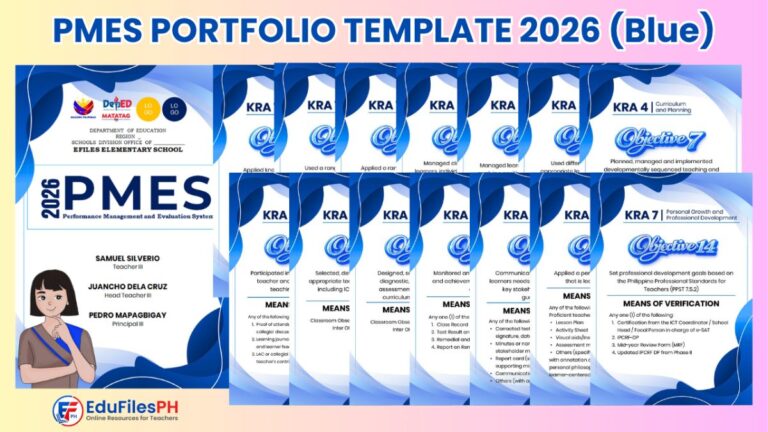
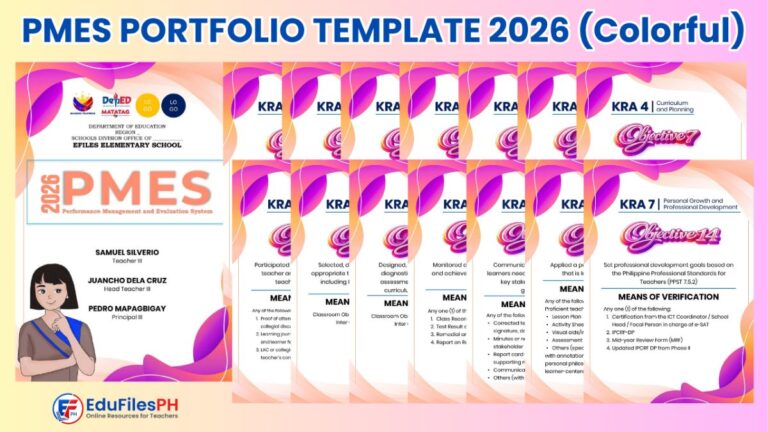
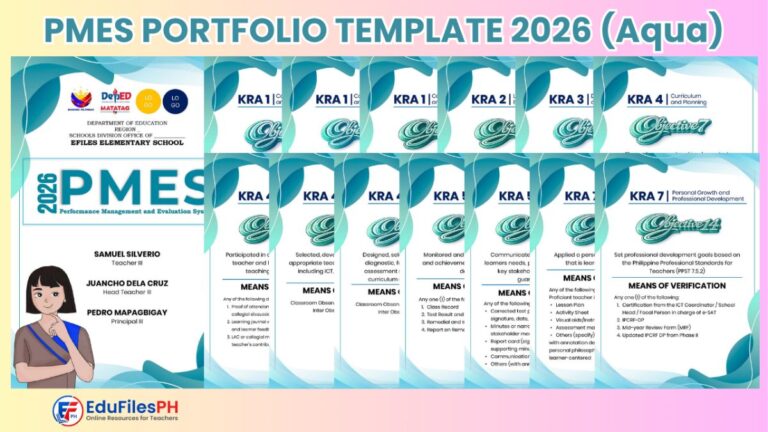
These PMES Portfolio Templates are available in different visual themes.
You may choose from:
- Blue Theme – clean, formal, and professional;
- Colorful Theme – vibrant and visually engaging; and
- Aqua Theme – fresh, modern, and minimalist.
All templates follow the same general structure. The main difference is the design style, color combination, and visual layout.
Available Template Versions
The templates are organized based on teacher position groups.
Available versions may include:
- PMES Portfolio Template for Teacher I-III;
- PMES Portfolio Template for Teacher IV-VII;
- PMES Portfolio Template for Master Teacher I-II.
Each position group may be available in Blue, Colorful, and Aqua themes.
What’s Included in the Template?
Depending on the version, the PMES Portfolio Template may include:
- portfolio cover page;
- teacher information page;
- school information section;
- school year label;
- position label;
- objective or indicator divider pages;
- MOV section pages;
- title pages for supporting documents;
- editable headings and labels;
- A4 print-ready layout;
- design elements and shapes;
- placeholders for teacher details; and
- clean pages for organizing PMES documents.
Why These Templates May Be Useful
A PMES portfolio is easier to review when documents are arranged clearly. A clean template also helps teachers present their MOVs in a more professional way.
These templates may help teachers:
- save time in designing cover pages;
- organize MOVs per objective or indicator;
- improve the appearance of the portfolio;
- make printed documents look more consistent;
- reduce layout preparation time;
- customize the file according to school needs;
- prepare professional-looking documents;
- keep PMES files easier to scan and review; and
- avoid starting from a blank PowerPoint file.
Important Reminder About MOVs
The template helps with organization and presentation, but the quality and validity of MOVs still depend on the actual documents submitted.
Teachers should make sure that their MOVs are:
- authentic;
- relevant to the objective or indicator;
- properly labeled;
- complete when required;
- aligned with school instructions;
- prepared within the correct school year;
- free from unnecessary personal or sensitive learner information; and
- checked before submission.
Do not include documents that are not yours, not applicable, or not required by your school. When in doubt, ask your school head, rater, or assigned PMES focal person for guidance.
How to Use the PMES Portfolio Template
- Download your preferred template version from the download section.
- Extract the ZIP file if the download comes in a compressed folder.
- Open the PowerPoint file using Microsoft PowerPoint.
- Install the required fonts if a font folder or instruction file is included.
- Edit the teacher name, position, school, and school year.
- Customize the section titles based on your PMES requirements.
- Insert or attach your MOVs after the appropriate cover or divider pages.
- Review the layout before printing.
- Set your printer to A4 paper size.
- Print the pages or save the file as PDF if needed.
- Follow your school’s official submission and checking process.
Important PowerPoint Editing Reminders
To avoid formatting problems, please check the file before editing or printing.
Here are some reminders:
- Use Microsoft PowerPoint for best compatibility.
- Keep one blank copy of the original template.
- Save a separate working copy before editing.
- Install included fonts first if available.
- If fonts are missing, replace them with readable system fonts.
- Do not stretch logos or images.
- Keep section titles short and readable.
- Review all teacher and school details before printing.
- Use A4 paper size for best output.
- Export to PDF if your school requires a non-editable copy.
Suggested Portfolio Organization
Teachers may organize their PMES portfolio using a simple and clear structure.
Suggested arrangement:
- Cover Page
- Teacher Information
- Table of Contents
- PMES Objectives or Indicators
- MOV Divider Pages
- Supporting Documents
- Certificates or Participation Documents
- Learner-Related Evidence, when applicable
- School-Based Accomplishments
- Reflection or Notes, if required
- Final Checklist
This is only a suggested structure. Always follow the arrangement required by your school or division.
Teacher Tip
Before printing the portfolio, prepare a checklist of required MOVs. Put a check mark beside each document once it is already inserted or attached to the correct section.
This helps prevent missing documents and makes the portfolio easier to review.
It is also helpful to rename your files clearly, such as:
PMES_Portfolio_Juan_Dela_Cruz_SY2025-2026.pptxor
PMES_Portfolio_TeacherIII_Sectioned_MOVs_SY2025-2026.pdfPreview of the Templates
Below is a preview of the PMES Portfolio Templates. The actual file may contain additional pages, section dividers, editable text, and design elements depending on the version and theme selected.
Important Reminder
These PMES Portfolio Templates are shared to help teachers save time in preparing and organizing their documents. Please review the templates carefully and customize them according to your school requirements.
The templates do not determine ratings, validate MOVs, or replace official PMES instructions. They are only layout and organization tools.
If you notice any error, broken link, missing page, or formatting issue, please message or contact EduFilesPH so we can review and update the template when needed.
Please do not repost, resell, or claim these templates as your own. You may share the official EduFilesPH post link instead so other teachers can access the original source.
Frequently Asked Questions
Are these PMES Portfolio Templates free?
Yes. These templates are shared for free to help teachers prepare their PMES portfolio more conveniently.
What file format is used?
The templates are prepared in editable PowerPoint format.
Are the templates ready for printing?
Yes. The templates are designed in A4 size, which makes them suitable for printing.
Can I edit the text and design?
Yes. The templates are editable. You can change the teacher name, position, school, school year, section labels, colors, and other editable elements.
What themes are available?
The available themes may include Blue, Colorful, and Aqua.
What position groups are available?
The templates may include versions for Teacher I-III, Teacher IV-VII, and Master Teacher I-II.
Are these official DepEd templates?
No. These are not official DepEd-issued templates. They are supplementary layout templates created by EduFilesPH to help teachers organize their PMES documents.
Are these templates enough for PMES submission?
No. The template only helps with organization and presentation. Teachers still need to prepare valid MOVs and follow official school instructions.
Can I use these templates for another school year?
Yes. Since the files are editable, you may update the school year and other details if your school allows the same layout to be used.
Do I need to install fonts?
Some designs may use specific fonts. If fonts are included or listed in the instructions, install them before opening the file to avoid formatting changes. If fonts are not available, you may use readable system fonts.
Can I convert the PowerPoint file to PDF?
Yes. You may export the file as PDF after editing if you need a non-editable copy for printing or submission.
Can I share these templates with other teachers?
You may share the official EduFilesPH post link. Please do not repost, resell, or claim the templates as your own.
Related Resources
You may also check these related EduFilesPH resources:
- Free Editable Communication Log for PMES Objective 12
- Free Editable LAC Plan for SY 2025–2026
- Free LAC Reflection Journal Sample for PMES
- Reading Intervention Report Template
- Numeracy Narrative Report Template
- Automated Test Result Analysis Template
- Summary of Grades Template with Ranking and Awardee Indicator
- Automated SF2 for SY 2026–2027
Download the PMES Portfolio Templates
You may download the available PMES Portfolio Templates below. Please choose the position group and design theme that matches your needs.
Aqua Theme

Blue Theme
Colorful Theme
Disclaimer
EduFilesPH shares educational templates and resources to help teachers and school personnel. The files are provided as supplementary tools and should be used with proper checking and school guidance.
These PMES Portfolio Templates are not official DepEd-issued templates. They are editable teacher-support resources created for convenience in organizing PMES MOVs and portfolio documents.
Users are advised to validate all documents, MOVs, labels, and portfolio sections according to their school’s official policies and PMES requirements. EduFilesPH is not officially affiliated with the Department of Education unless clearly stated. Always refer to official DepEd issuances, school instructions, and division or regional directions when preparing official PMES documents.
thank you for these very helpful examples and files
THANKS A LOT 🙂 more power po