
Accomplishing School Form 8, or SF8, can take a lot of time, especially when teachers need to encode learner information, compute BMI, identify BMI Category, determine Height-for-Age, and prepare summary counts for the class.
To help teachers save time, EduFilesPH is sharing this Automated SF8 Excel Template. This file is designed to help class advisers prepare the Learner’s Basic Health and Nutrition Report in a more organized and convenient way.
With this template, teachers can encode learner data, enter weight and height, and let the file generate the BMI, BMI Category, Height-for-Age, and summary tables automatically depending on the setup of the workbook.
Please remember that this file is a teacher support tool. Teachers should still follow their school’s official instructions and coordinate with the school health personnel, clinic teacher, nutrition coordinator, or assigned school form checker when preparing official reports.
Resource Information
Resource Type: Automated School Form Template
Related Form: School Form 8 / SF8
Official Form Name: Learner’s Basic Health and Nutrition Report
File Format: Microsoft Excel file
Main Use: Recording learner health and nutrition data
Recommended Users: Class advisers, teachers, school health personnel, nutrition coordinators, and school form coordinators
Automation Type: Formula-based Excel template
Main Computations: BMI, BMI Category, Height-for-Age, and summary counts
Reference for Growth Categories: WHO Growth Reference Data for 5–19 years
What Is SF8?
SF8, or School Form 8, is the Learner’s Basic Health and Nutrition Report. It is used to record learner health and nutrition-related information such as weight, height, BMI, BMI Category, Height-for-Age, and related remarks.
This form helps schools monitor learners’ nutritional status and identify learners who may need follow-up, referral, or support. It is also useful for organizing class-level health and nutrition data in one report.
The Automated SF8 template is designed to make this process easier by reducing repetitive computation and helping teachers prepare cleaner records.
About This Automated SF8 Template
This Automated SF8 Excel Template is not just a digital copy of the form. It includes formulas and reference tables that help compute and classify learner nutritional data more conveniently.
Based on the uploaded original post, the tool was designed to support instant BMI calculation, automatic categorization, summary table generation, and error prevention through data validation.
Depending on the version of the file, the template may include:
- learner information section;
- birthdate and age computation;
- weight and height entry fields;
- height squared computation;
- BMI computation;
- BMI Category;
- Height-for-Age result;
- male and female summary tables;
- printable SF8 layout;
- helper tables for BMI and HFA reference values; and
- formula-based automation.
Why This Automated SF8 May Be Useful
Preparing SF8 manually can be time-consuming because teachers need to compute BMI and classify learners one by one. This becomes more difficult when there are many learners in a class.
This Automated SF8 may help teachers:
- encode learner names and basic information;
- enter weight and height measurements;
- compute BMI automatically;
- identify BMI Category based on learner age and sex;
- identify Height-for-Age classification;
- generate summary counts for male and female learners;
- reduce repetitive manual checking;
- prepare cleaner SF8 records;
- save time during school form preparation;
- avoid common encoding mistakes; and
- organize learner health data in one Excel file.
BMI Formula Used in the Template
BMI means Body Mass Index. It is computed using the learner’s weight and height.
Use this formula:
| Computation | Formula |
|---|---|
| BMI | Weight in kilograms ÷ Height in meters squared |
| BMI | Weight (kg) ÷ Height (m)² |
In simple form:
BMI = Weight (kg) / [Height (m) × Height (m)]Example:
Weight: 40 kg
Height: 1.50 m

BMI = 40 / (1.50 × 1.50)
BMI = 40 / 2.25
BMI = 17.78
The BMI result alone is not enough for school-age learners. For children and adolescents, BMI should be interpreted using age- and sex-based reference values.
Source for BMI Category and Height-for-Age
The Automated SF8 uses reference values for BMI Category and Height-for-Age based on the World Health Organization Growth Reference Data for 5–19 years.
WHO provides growth reference data for children and adolescents aged 5–19 years, including indicators for BMI-for-age and Height-for-age.
For BMI-for-age, WHO identifies cut-offs such as:
| WHO BMI-for-Age Interpretation | Cut-off |
|---|---|
| Severe thinness | Less than -3 SD |
| Thinness | Less than -2 SD |
| Overweight | Greater than +1 SD |
| Obesity | Greater than +2 SD |
WHO’s BMI-for-age page lists these cut-offs and provides BMI-for-age charts and tables for boys and girls aged 5–19 years.
For Height-for-Age, WHO provides separate charts and tables for boys and girls aged 5–19 years. These tables are used as reference values for identifying whether a learner falls under categories such as severely stunted, stunted, normal, or tall depending on age, sex, and measured height.
BMI Category Used in SF8
In SF8 reporting, the BMI result is commonly classified into learner-friendly nutritional status categories.
The template may display categories such as:
- Severely Wasted;
- Wasted;
- Normal;
- Overweight; and
- Obese.
These categories are based on the learner’s BMI result compared with age- and sex-based reference values.
Important note: WHO uses terms such as severe thinness, thinness, overweight, and obesity in its BMI-for-age cut-offs. In school forms, these may be reflected using SF8 reporting labels such as Severely Wasted, Wasted, Normal, Overweight, and Obese.
Height-for-Age Used in SF8
Height-for-Age, or HFA, is used to compare a learner’s height with age- and sex-based reference values.
The template may display HFA categories such as:
- Severely Stunted;
- Stunted;
- Normal; and
- Tall.
This helps teachers and school personnel identify learners whose height-for-age result may need further review, monitoring, or referral based on school health procedures.
Key Features of the Automated SF8
This Automated SF8 template may include the following features:
Instant BMI Calculation
After entering the learner’s weight and height, the file can compute the BMI automatically.
Automatic BMI Category
The file can identify the learner’s BMI Category using age, sex, weight, height, and reference values.
Height-for-Age Classification
The template can identify the learner’s Height-for-Age result using age, sex, and measured height.
Summary Table Generation
The file may automatically count the number of male and female learners under each BMI Category and HFA category.
Cleaner Printable Format
The layout is designed to help teachers prepare a cleaner SF8 report for checking, printing, and submission.
Helper Tables
The workbook may include helper tables for BMI-for-age and Height-for-Age reference values.
Error Prevention
The template may include data validation or protected formula sections to help reduce common encoding and computation errors.
What’s Included in the File?
The Automated SF8 template may include the following parts:
- SF8 printable report sheet;
- learner information table;
- LRN and learner name columns;
- birthdate entry;
- automatic age computation;
- weight entry in kilograms;
- height entry in meters;
- height squared computation;
- BMI computation;
- BMI Category;
- Height-for-Age classification;
- remarks column;
- summary table for male learners;
- summary table for female learners;
- BMI helper table;
- HFA helper table; and
- instructions or reminders for use.
How to Use the Automated SF8
- Download the Excel file from the download section.
- Open the file using Microsoft Excel.
- Save a backup copy before encoding actual learner data.
- Encode the required school information.
- Copy and paste your learner list from SF1, SF2, or your class masterlist.
- Enter the learner’s birthdate in the required date format.
- Encode the learner’s weight in kilograms.
- Encode the learner’s height in meters.
- Allow the file to compute BMI, BMI Category, and Height-for-Age.
- Review the summary tables.
- Check the results before printing or submitting.
- Follow your school’s official checking and submission process.
Important Encoding Reminders
To help the file work properly, make sure the required fields are encoded correctly.
Here are some reminders:
- Use Microsoft Excel for best compatibility.
- Enter weight in kilograms.
- Enter height in meters.
- Use the correct birthdate format required by the file.
- Check if the learner is male or female before relying on the category result.
- Do not type over formula cells.
- Do not delete helper tables or hidden computation areas.
- Review the generated BMI Category and HFA results.
- Coordinate with the school health personnel or assigned checker for validation.
- Contact EduFilesPH if you notice any error, inconsistency, or formula issue.
Important Date Format Reminder
The original template reminder notes that the computer date format should be set properly to help the age column calculate correctly.
Suggested format:
MM/DD/YYYYIf the age does not compute correctly, check the birthdate entry, date of measurement, and your computer’s regional date format.
Teacher Tip
Before encoding the actual class data, test the file first using a few sample learners. This helps you understand how the BMI, BMI Category, Height-for-Age, and summary tables work.
After testing, create a clean working copy for your actual class. This prevents sample data from mixing with official learner records.
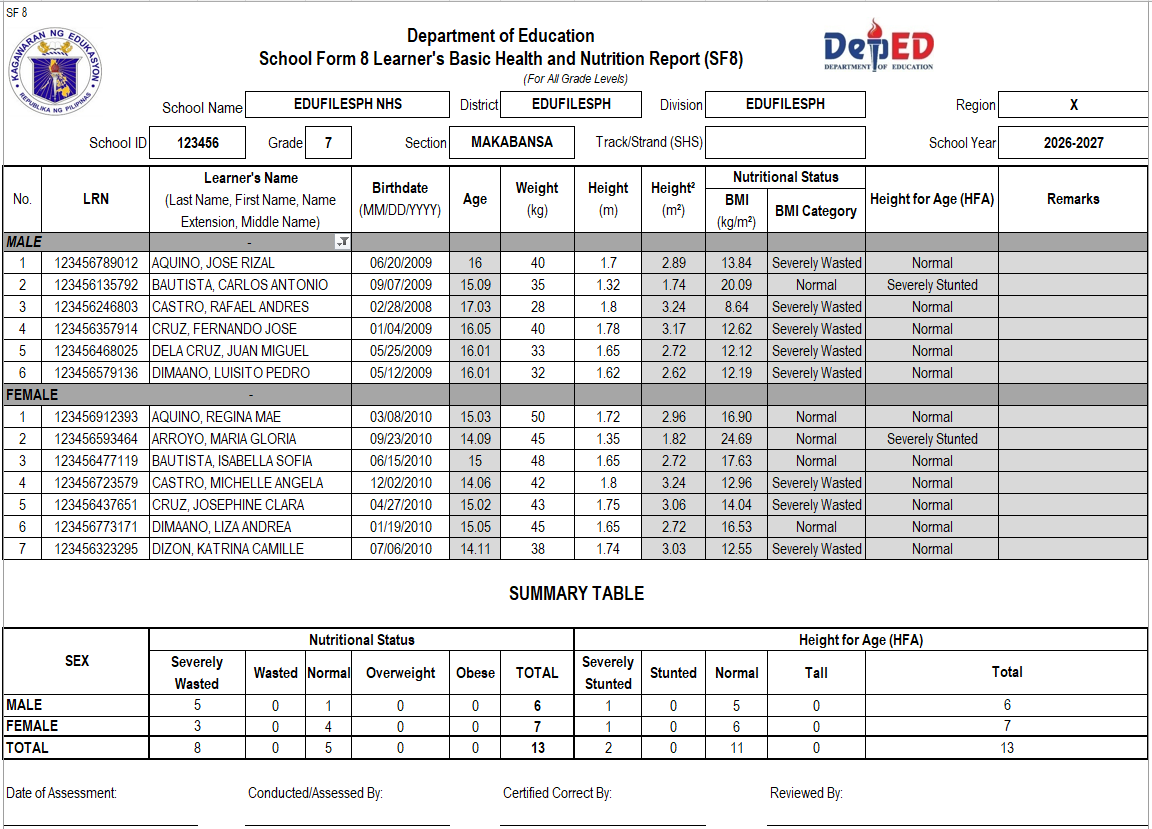
Preview of the File
Below is a preview of the Automated SF8 template. The actual file may contain additional sheets, helper tables, formulas, summaries, or printable sections depending on the version provided.
👉 Need the Unprotected Version?
🚀 💡 If you want to avail the UNPROTECTED version of the Automated SF8, message our Facebook Page with: “Unprotected Automated SF8”
The unprotected version may be useful for users who need to study, adjust, or customize the formulas and helper tables. However, please make sure that any changes are carefully reviewed because editing formulas may affect the accuracy of the results.
📲 Tap or scan the QR code to message us now.

Important Reminder
This Automated SF8 is shared to help teachers save time in preparing the Learner’s Basic Health and Nutrition Report. Please review the file, encode only in the correct input areas, and check the generated results before using them for school records.
If you notice any error, inconsistency, formula issue, or mismatch while using the file, please message or contact EduFilesPH so we can review the concern and update the template when needed.
Please do not repost, resell, or claim this file as your own. You may share the official EduFilesPH post link instead so other teachers can access the original source.
Frequently Asked Questions
Is this Automated SF8 free to download?
Yes. This post provides a free Automated SF8 Excel template for teachers.
What is SF8?
SF8 is the Learner’s Basic Health and Nutrition Report. It records learner health and nutrition-related data such as weight, height, BMI, BMI Category, and Height-for-Age.
Does this file compute BMI automatically?
Yes. The file may compute BMI automatically after the teacher encodes the learner’s weight and height.
What is the formula for BMI?
The formula is:
BMI = Weight (kg) / [Height (m) × Height (m)]What source is used for BMI Category?
The BMI Category is based on age- and sex-based BMI-for-age reference values from the World Health Organization Growth Reference Data for 5–19 years. WHO provides BMI-for-age charts and tables for boys and girls.
What source is used for Height-for-Age?
The Height-for-Age result is based on WHO Height-for-Age charts and tables for boys and girls aged 5–19 years.
Why are age and sex important in identifying BMI Category and HFA?
For school-age children and adolescents, BMI and height are interpreted using age- and sex-based reference values. The same BMI or height may have a different category depending on the learner’s age and sex.
Can I edit the formulas?
The free version may have protected formula cells to prevent accidental changes. If you need an unprotected version, you may message EduFilesPH and send: Unprotected Automated SF8.
Can I use this in Google Sheets?
Microsoft Excel is recommended. Some formulas, formatting, protection settings, or workbook features may not work the same way in Google Sheets.
What should I do if the age does not compute correctly?
Check the birthdate, date of measurement, and date format. The original template reminder suggests using the MM/DD/YYYY date format.
Is this the official DepEd SF8?
No. This is not an official DepEd-issued SF8 file. It is an automated teacher resource created to help teachers prepare SF8 more conveniently.
Is this ready for official submission?
This file is a support template. Teachers should still follow their school’s official instructions for checking, validation, printing, submission, and reporting.
What should I do if I find an error or inconsistency?
Please message or contact EduFilesPH. Include the file version, screenshot if possible, and a short explanation of the issue so we can review it properly.
Can I share this file with other teachers?
You may share the official EduFilesPH post link. Please do not repost, resell, or claim the file as your own.
Related Resources
You may also check these related EduFilesPH resources:
- Automated SF2 for SY 2026–2027
- Free Three-Term Electronic Class Record for SY 2026–2027
- Automated SF9 with Consolidated Grades Template
- Automated Test Result Analysis Template
- Free Editable Summary of Grades
- Free Editable Communication Log for PMES Objective 12
Download the Automated SF8 Template
You may download the Automated SF8 Excel template using the button below. Please review the file, encode the required data carefully, and check the generated results before using it for school records.

Source References
The BMI Category and Height-for-Age references used in this post are based on the World Health Organization Growth Reference Data for children and adolescents aged 5–19 years.
- WHO Growth Reference Data for 5–19 years
- WHO BMI-for-age tables and charts
- WHO Height-for-age tables and charts
Disclaimer
EduFilesPH shares educational templates and resources to help teachers and school personnel. The files are provided as supplementary tools and should be used with proper checking and school guidance.
This Automated SF8 is not an official DepEd-issued School Form 8. It is a modified and automated teacher resource created for convenience in preparing the Learner’s Basic Health and Nutrition Report.
The BMI Category and Height-for-Age results generated by the file should be reviewed and validated according to school procedures. For health-related concerns, teachers should coordinate with school health personnel, nutrition coordinators, parents or guardians, and appropriate offices.
EduFilesPH is not officially affiliated with the Department of Education unless clearly stated. Always refer to official DepEd issuances, school instructions, school health procedures, and division or regional directions when preparing official school records.