
Managing learner attendance does not have to be time-consuming. With a properly prepared School Form 2 template, class advisers can record daily attendance, monitor absences, check monthly totals, and prepare attendance summaries more conveniently.
For SY 2026–2027, EduFilesPH is sharing a free Automated SF2 for June 2026. This Excel-based template is designed to help teachers track daily learner attendance, compute monthly summaries, and prepare attendance records using a cleaner and more organized format.
This Automated SF2 is prepared for the Three-Term School Calendar under DepEd Order No. 009, s. 2026. It is intended to help teachers align attendance monitoring with the official school calendar, actual school days, and monthly reporting needs.
Please remember that this file is a teacher support tool. Teachers should still follow the instructions of their school, district, division, region, or DepEd when preparing and submitting official school forms.
Resource Information
Resource Type: Automated SF2 Template
Related Form: School Form 2 / SF2
File Format: Microsoft Excel file
Available File: June 2026 Automated SF2
School Year: SY 2026–2027
Calendar Basis: Three-Term School Calendar
Reference: DepEd Order No. 009, s. 2026
Main Use: Learner attendance monitoring and monthly attendance summary
Recommended Users: Class advisers, teachers, school personnel, and school form coordinators
Automation Type: Formula-based Excel template
About This Automated SF2
The Automated SF2 for SY 2026–2027 is an Excel-based attendance template designed to help teachers organize daily learner attendance records and monthly attendance summaries.
Depending on the version of the file, the template may include editable sections for school information, class details, learner names, daily attendance entries, monthly totals, attendance-related computations, and printable SF2 pages.
This template is useful for teachers who want a cleaner and faster way to prepare attendance records. It can help reduce manual counting, make records easier to review, and save time during checking and submission periods.
Basis of the Automated SF2
This Automated SF2 was prepared using the Three-Term School Calendar for SY 2026–2027 as basis.
Under DepEd Order No. 009, s. 2026, SY 2026–2027 formally opens on June 8, 2026 and ends on March 31, 2027. The school year is organized into three terms and includes opening, instructional, and end-of-term blocks.
Because SF2 is used to record daily learner attendance, the template was prepared to help teachers track attendance according to official school days and reporting months. Teachers should still check school-level instructions, local holidays, class suspensions, calendar adjustments, and other official announcements that may affect actual class days.
Why This Automated SF2 May Be Useful
Attendance monitoring is part of the regular documentation work of class advisers. A clear and organized SF2 helps teachers track learner attendance and prepare records needed by the school.
This Automated SF2 may help teachers:
- encode learner names and class information;
- record daily attendance in an organized format;
- monitor absences and tardiness;
- prepare monthly attendance summaries;
- identify the number of school days per reporting month;
- reduce repetitive manual counting;
- compute attendance-related values more conveniently;
- make attendance records easier to review;
- prepare printable SF2 pages;
- save time during school form checking; and
- keep class attendance records in one Excel file.
Key Features of the Automated SF2
The actual file may vary depending on the version provided, but the Automated SF2 may include the following features:
- editable school and class information;
- learner list input area;
- daily attendance recording sections;
- monthly attendance monitoring sheet;
- calendar-based attendance setup;
- automated counting of attendance entries;
- summary of absences and tardiness;
- computation of attendance-related values;
- printable SF2 format;
- clean and teacher-friendly layout;
- formula-based automation;
- protected formula or computation areas when applicable;
- no complicated setup for basic users; and
- ready-to-customize Excel format.
SF2 Computation Formulas
The Automated SF2 includes attendance-related computations to help teachers prepare monthly summaries more conveniently. Below are the common formulas used in the SF2 summary section.
| Computation | Formula |
|---|---|
| Percentage of Enrolment | Registered Learner as of End of the Month ÷ Enrolment as of 1st Friday of the SY × 100 |
| Average Daily Attendance | Total Daily Attendance ÷ Number of School Days in reporting month |
| Percentage of Attendance for the Month | Average Daily Attendance ÷ Registered Learner as of End of the Month × 100 |
These formulas help teachers understand how the monthly attendance summary values are derived. The Excel file may compute these values automatically depending on the version provided.
Teachers should still review the encoded attendance, registered learner count, number of school days, and generated summary before printing or submitting the form.
How the Automated SF2 Works
The file is designed to help teachers manage daily and monthly attendance records in one workbook.
In general, teachers will:
- encode the school and class information;
- enter the names of learners;
- record daily attendance using the correct attendance marks;
- review the number of school days for the reporting month;
- check the attendance totals and summaries;
- review the computed values such as average daily attendance and attendance percentage;
- print or save the output based on school instructions.
The automation helps reduce repetitive counting, but teachers should still check the attendance entries and generated summaries before submission.
Monthly Updated SF2 Files
To make the file easier to use, the Automated SF2 may be shared as monthly files. The June 2026 file is currently available, while the next monthly files may be uploaded or updated as the school year progresses.
The monthly set may include:
- June 2026 SF2;
- July 2026 SF2;
- August 2026 SF2;
- September 2026 SF2;
- October 2026 SF2;
- November 2026 SF2;
- December 2026 SF2;
- January 2027 SF2;
- February 2027 SF2;
- March 2027 SF2; and
- April 2027 SF2.
Each monthly file should be checked against the official calendar, school-level instructions, and any approved adjustments that may affect the actual number of class days.
What’s Included in the File?
The Automated SF2 template may include the following parts:
- school information section;
- school year setup;
- grade and section details;
- adviser information;
- learner name list;
- daily attendance entry area;
- monthly attendance monitoring sheet;
- number of school days section;
- automated attendance totals;
- monthly summary section;
- percentage of enrolment;
- average daily attendance;
- percentage of attendance for the month;
- printable SF2 layout;
- reminders or instructions for use; and
- formula-based computation areas.
How to Use This Automated SF2
- Download the Excel file from the download section.
- Open the file using Microsoft Excel.
- Read the instructions or reminders inside the workbook.
- Save a backup copy of the original file before entering data.
- Encode the school name, grade level, section, adviser name, and other class details.
- Enter the learner names carefully.
- Record attendance in the correct input areas.
- Check the number of school days for the reporting month.
- Review the monthly attendance totals.
- Check the computed attendance summary values.
- Avoid editing formula cells or protected computation areas.
- Check the final output based on your school’s instructions.
- Save your working copy using a clear file name.
Important Excel Reminders
Before using the file, it is best to prepare a clean working copy. This helps prevent accidental data loss and keeps the original file available for future use.
Here are some reminders:
- Keep one blank copy of the template as your original backup.
- Duplicate the file before encoding actual learner data.
- Use Microsoft Excel for best compatibility.
- Encode only in the editable input areas.
- Do not delete formulas, hidden sheets, rows, columns, or protected areas.
- Check the number of school days per reporting month.
- Review the computed monthly summary before printing or submitting.
- Follow your school’s instructions for official SF2 preparation.
- Contact EduFilesPH if you notice any error, inconsistency, formula issue, or mismatch.
Teacher Tip
Update the SF2 regularly instead of encoding attendance only at the end of the month. Daily or weekly updating makes the record easier to check and reduces the chance of missing attendance entries.
It is also helpful to compare the monthly summary with your class records before printing or submitting the file. This simple checking step can help avoid errors in attendance totals and computed percentages.
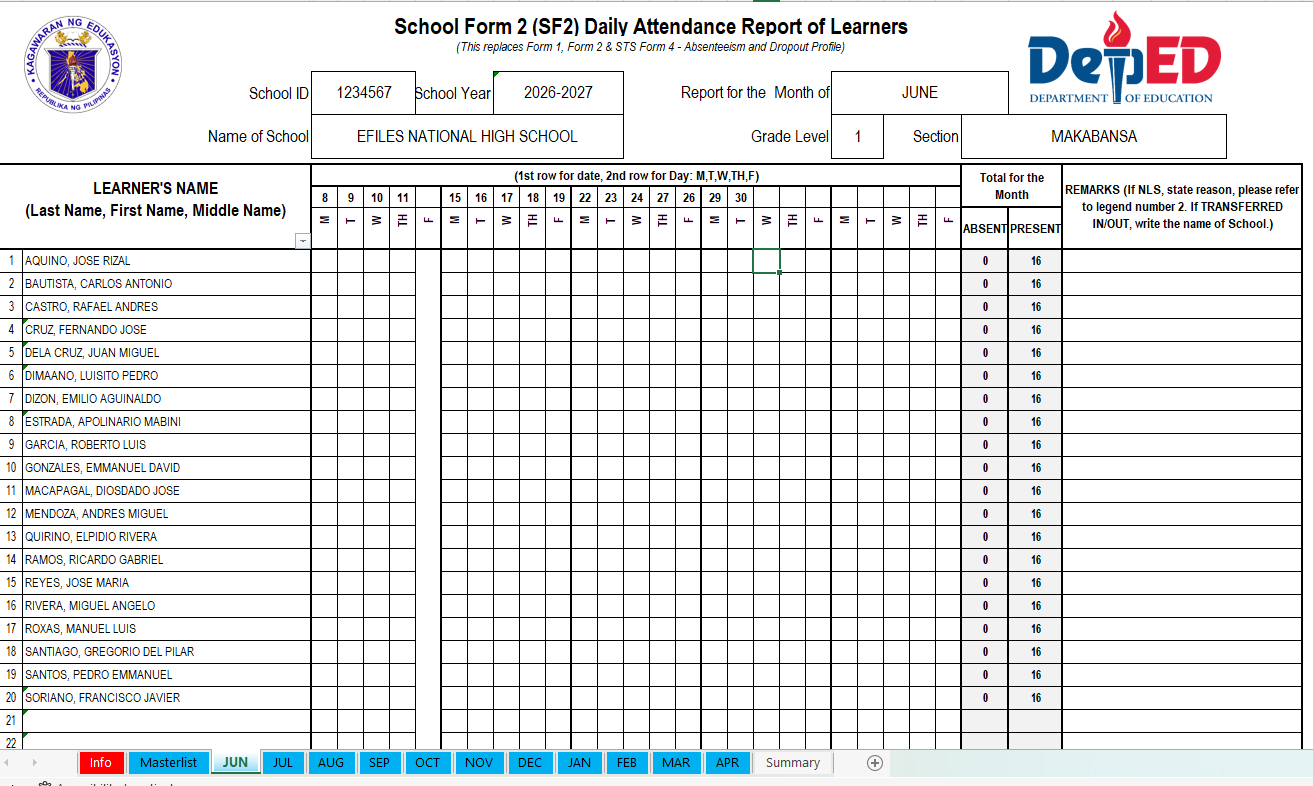
Preview of the File
Below is a preview of the Automated SF2 template. The actual file may contain additional sheets, formulas, summaries, or printable sections depending on the version provided.
🚀 Need the COMPLETE Automated SF2 for SY 2026–2027 from June 2026 to April 2027?
Message our Facebook Page and send:
“Complete Automated SF2 SY 2026-2027”
📁 Complete set of monthly files
📅 Based on the official Three-Term School Calendar
⚡ Convenient for teachers who want the full file in one go
📲 Tap or scan the QR code to message us now.

Important Reminder
This Automated SF2 is shared to help teachers save time in preparing learner attendance records. Please review the file, encode only in the editable areas, and check the generated summaries before using them for school records.
If you notice any error, inconsistency, formula issue, or mismatch while using the file, please message or contact EduFilesPH so we can review the concern and update the template when needed.
Please do not repost, resell, or claim this file as your own. You may share the official EduFilesPH post link instead so other teachers can access the original source.
Frequently Asked Questions
Is this Automated SF2 free to download?
Yes. This post provides a free Automated SF2 monthly file for teachers.
What month is currently available?
The currently available file is the June 2026 Automated SF2.
Is this SF2 based on the Three-Term School Calendar?
Yes. The template is prepared based on the SY 2026–2027 Three-Term School Calendar under DepEd Order No. 009, s. 2026.
Is this SF2 editable?
The input areas are editable. Teachers may encode learner names, school details, class information, and attendance entries in the allowed sections.
Can I edit the formulas?
Formula cells and computation areas should not be edited. If you find any formula issue or inconsistency, please contact EduFilesPH so we can check and update the file if needed.
Can I use this for SY 2026–2027?
Yes. This template is prepared for SY 2026–2027. However, teachers should still check the school calendar setup, dates, and school instructions before using it.
Does this automatically count attendance?
The template may include formula-based counting for attendance summaries. Teachers should still review the generated totals before printing or submitting.
Does it compute attendance percentages?
The file may compute attendance-related values such as percentage of enrolment, average daily attendance, and percentage of attendance for the month, depending on the version provided.
Is the June 2026 file the only free file available?
The June 2026 Automated SF2 file is currently provided as the available monthly file. Other monthly files may be uploaded or updated later.
Can I request the complete SF2 set?
Yes. If you need the complete Automated SF2 set from June 2026 to April 2027, you may message EduFilesPH and send: Complete Automated SF2 SY 2026-2027.
What formulas are used in the SF2 summary?
The template may use formulas for Percentage of Enrolment, Average Daily Attendance, and Percentage of Attendance for the Month. These are explained in the SF2 Computation Formulas section of this post.
Can I use this in Google Sheets?
Microsoft Excel is recommended. Some formulas, formatting, protection settings, or workbook features may not work the same way in Google Sheets.
What should I do before encoding actual learner data?
Save a backup copy first. Then test the file using sample learner names and sample attendance entries to understand how the workbook works.
What should I check before submitting the SF2?
Check the learner names, daily attendance entries, number of school days, registered learner count, monthly totals, and generated summaries. Also follow your school’s official checking and submission process.
What should I do if I find an error or inconsistency?
Please message or contact EduFilesPH. Include the file version, screenshot if possible, and a short explanation of the issue so we can review it properly.
Is this the official DepEd SF2?
No. This is not an official DepEd-issued file. It is an automated teacher resource created to help teachers prepare attendance records more conveniently.
Is this ready for official submission?
This file is a support template. Teachers should still follow their school’s official instructions for checking, printing, submission, and validation of school forms.
Can I share this file with other teachers?
You may share the official EduFilesPH post link. Please do not repost, resell, or claim the file as your own.
Related Resources
You may also check these related EduFilesPH resources:
- Free Three-Term Electronic Class Record for SY 2026–2027
- Automated SF9 with Consolidated Grades Template
- Free Editable Summary of Grades
- Automated Test Result Analysis Template
- Free Editable Communication Log for PMES Objective 12
Download the Automated SF2 Monthly File
You may download the available Automated SF2 monthly file below. Please review the file, encode only in the editable areas, and check the generated summaries before using it for school records.
Available File

Coming Soon
The following monthly files may be added or updated later:
- August 2026 SF2
- September 2026 SF2
- October 2026 SF2
- November 2026 SF2
- December 2026 SF2
- January 2027 SF2
- February 2027 SF2
- March 2027 SF2
- April 2027 SF2
Bookmark this page and check back for monthly updates.
Disclaimer
EduFilesPH shares educational templates and resources to help teachers and school personnel. The files are provided as supplementary tools and should be used with proper checking and school guidance.
This Automated SF2 is not an official DepEd-issued School Form 2. It is a modified and automated teacher resource created for convenience in recording and summarizing learner attendance.
Users are advised to validate all entries, summaries, formulas, and outputs according to their school’s official policies and requirements. EduFilesPH is not officially affiliated with the Department of Education unless clearly stated. Always refer to official DepEd issuances, school instructions, school form guidelines, and division or regional directions when preparing official school records.
thank you! God bless u more!
thank you so much po and Godbless
Thank you so much po. Very helpful po
Pasend po ma’am, tnx po.
THANK YOU VERY MUCH AND MAY ALMIGHTY BLESS YOU.
COMPLETE SCHOOL FORM 2 AUTOMATED NGA PO PLEASE.
Thank you. It really a big help for me as a g2 teacher.
thank you so much…really a big help..